Wow! First post in 2012! Time flies...
Well Liferay dev for me has slowed down and there's been more of a concentration on other things like main product development, tradeshows etc... However, I have been working on (and almost completed) an online catalogue using the plugins SDK.
Unfortunately, I haven't been authorized to upgrade to the latest version of Liferay 6 so I'm still working with 5.2.3. This means that the internal jQuery being used is 1.2.6. I've encountered many challenges using plugins that require a later version like 1.7 so I've either had to rewrite plugins or (sloppy I know) incorporate the plugin into an iframe. It works quite efficiently but...
Anyone else experiencing this company aggravation? Share your woes!
Saturday, July 7, 2012


Monday, July 25, 2011
Filament Group iPod Drill-Down Menu As a Context Menu
Filament Group has an awesome menu but I needed it to work as a context menu (right clicking will bring up the menu.) If you need to do that too, just replace the following in the Javascript file (Note, I've just commented out the original and put the new code in under it):
$.fn.menu = function(options){
var caller = this;
var options = options;
var m = new Menu(caller, options);
allUIMenus.push(m);
/*$(this)
.mousedown(function(){
if (!m.menuOpen) { m.showLoading(); };
})
.click(function(){
if (m.menuOpen == false) { m.showMenu(); }
else { m.kill(); };
return false;
}); */
/*New code for context menu*/
$(this)
.bind('contextmenu',function(e){
if (m.menuOpen == false) { m.showMenu(); }
else { m.kill(); };
return false;
});
};
Enjoy!
Here's the menu from Filament Group: http://www.filamentgroup.com/examples/menus/ipod.php
Thursday, June 16, 2011
Liferay Theme Conversion - 5.2.3 - 6.0.6
TEMPLATES
PORTAL_NORMAL
-Under the body tag, put the following code in to display the Admin bar after sign-in:
#if($is_signed_in)
#dockbar()
#end
-Remove the following line under the body tag:
#$theme.include($top_messages_include)
-There is no dock any more. Remove
#parse ("$full_templates_path/dock.vm")
CSS
-Modify main.css to include the following:
@import url(dockbar.css);
@import url(extras.css);
-Copy those css files to your css directory.
-REPLACE the application.css file (to get the dock working)
PORTAL_NORMAL
-Under the body tag, put the following code in to display the Admin bar after sign-in:
#if($is_signed_in)
#dockbar()
#end
-Remove the following line under the body tag:
#$theme.include($top_messages_include)
-There is no dock any more. Remove
#parse ("$full_templates_path/dock.vm")
CSS
-Modify main.css to include the following:
@import url(dockbar.css);
@import url(extras.css);
-Copy those css files to your css directory.
-REPLACE the application.css file (to get the dock working)
Thursday, October 21, 2010
Liferay Import - Large LAR's
Technical Details:
LAR = 111M (326 pages)
Uploaded on local dev system running Win XP using FF 3.6.8
Liferay 5.2.3 Bundle with Tomcat 6
Postgres database
Scenario:
Copy info from the Guest Community into a new Community for setup with Virtual Hosting.
Action:
It's important to keep in mind that Liferay has max file sizes that can be uploaded and that also includes a threshold for the input stream. In my case, a default export resulted in a LAR that was 111M (326 pages). To accommodate this size, the following was put in to ROOT\WEB-INF\classes\portal-ext.properties (I bloated the size more than needed intentionally):
# Set the maximum file size. Default is 1024 * 1024 * 100. (default 104857600)
com.liferay.portal.upload.UploadServletRequestImpl.max.size=209857600# Set the threshold size to prevent out of memory exceptions caused by
# caching excessively large uploaded data. Default is 1024 * 1024 * 10. (default 104857600)
com.liferay.portal.upload.LiferayInputStream.threshold.size=209857600
The next step was to go to Control Panel -> Server Administration -> File Uploads. There, I marked all file sizes as 0 (unlimited). Alternatively, you can mark the sizes in the portal-ext.properties as well (Ex. dl.file.max.size=0 , ig.image.max.size=0 , journal.image.small.max.size=0)
REBOOT Tomcat (important!)
Then do the import as you normally would.
Lessons Learnt:
-Strange but true, IE (8) and FF show different error strack traces. Browser wise, In most cases, IE would throw up a 404 error on failure where FF retained the current page and Liferay threw up a catch-all error message.
-At one point, I also tested on a remote system. After an eon, the system asked if I wanted to extend my session and I clicked yes. Just at that time, I got an error message as posted in LPS-10837.
-For kicks, I tried importing the Postgres-based LAR file into a MySQL database. Interestingly, the error message it threw was the SAME error message as reported by Josh Asbury in LPS-1981. In that ticket, Josh blames the error on a missing UTF8 character set however, it looks like the same error is tripped if importing from incompatible databases. (My stack trace at the bottom.)
In Conclusion:
The Export/Import feature is a necessity but God, it's cranky!
Good luck!
The following was MY stack trace:
13:40:54,121 ERROR [JDBCExceptionReporter:101] Incorrect string value: '\xEF\xBF\xBDs, ...' for column 'content' at row 1
13:40:54,277 ERROR [ImportPagesAction:85] com.liferay.portal.SystemException: com.liferay.portal.lar.PortletDataException: com.liferay.portal.SystemException: com.l
rnel.dao.orm.ORMException: Could not execute JDBC batch update
com.liferay.portal.SystemException: com.liferay.portal.lar.PortletDataException: com.liferay.portal.SystemException: com.liferay.portal.kernel.dao.orm.ORMException:
te JDBC batch update
at com.liferay.portal.lar.PortletImporter.importPortletData(PortletImporter.java:467)
at com.liferay.portal.lar.PortletImporter.importPortletData(PortletImporter.java:367)
at com.liferay.portal.lar.LayoutImporter.importLayouts(LayoutImporter.java:627)
at com.liferay.portal.service.impl.LayoutLocalServiceImpl.importLayouts(LayoutLocalServiceImpl.java:625)
at com.liferay.portal.service.impl.LayoutLocalServiceImpl.importLayouts(LayoutLocalServiceImpl.java:596)
at sun.reflect.NativeMethodAccessorImpl.invoke0(Native Method)
at sun.reflect.NativeMethodAccessorImpl.invoke(NativeMethodAccessorImpl.java:39)
at sun.reflect.DelegatingMethodAccessorImpl.invoke(DelegatingMethodAccessorImpl.java:25)
at java.lang.reflect.Method.invoke(Method.java:585)
at org.springframework.aop.support.AopUtils.invokeJoinpointUsingReflection(AopUtils.java:307)
at org.springframework.aop.framework.ReflectiveMethodInvocation.invokeJoinpoint(ReflectiveMethodInvocation.java:182)
at org.springframework.aop.framework.ReflectiveMethodInvocation.proceed(ReflectiveMethodInvocation.java:149)
at org.springframework.transaction.interceptor.TransactionInterceptor.invoke(TransactionInterceptor.java:106)
at org.springframework.aop.framework.ReflectiveMethodInvocation.proceed(ReflectiveMethodInvocation.java:171)
at org.springframework.aop.interceptor.ExposeInvocationInterceptor.invoke(ExposeInvocationInterceptor.java:89)
at org.springframework.aop.framework.ReflectiveMethodInvocation.proceed(ReflectiveMethodInvocation.java:171)
at org.springframework.aop.framework.JdkDynamicAopProxy.invoke(JdkDynamicAopProxy.java:204)
at $Proxy25.importLayouts(Unknown Source)
at com.liferay.portal.service.impl.LayoutServiceImpl.importLayouts(LayoutServiceImpl.java:210)
at sun.reflect.NativeMethodAccessorImpl.invoke0(Native Method)
at sun.reflect.NativeMethodAccessorImpl.invoke(NativeMethodAccessorImpl.java:39)
at sun.reflect.DelegatingMethodAccessorImpl.invoke(DelegatingMethodAccessorImpl.java:25)
at java.lang.reflect.Method.invoke(Method.java:585)
at org.springframework.aop.support.AopUtils.invokeJoinpointUsingReflection(AopUtils.java:307)
at org.springframework.aop.framework.ReflectiveMethodInvocation.invokeJoinpoint(ReflectiveMethodInvocation.java:182)
at org.springframework.aop.framework.ReflectiveMethodInvocation.proceed(ReflectiveMethodInvocation.java:149)
at org.springframework.transaction.interceptor.TransactionInterceptor.invoke(TransactionInterceptor.java:106)
at org.springframework.aop.framework.ReflectiveMethodInvocation.proceed(ReflectiveMethodInvocation.java:171)
at org.springframework.aop.interceptor.ExposeInvocationInterceptor.invoke(ExposeInvocationInterceptor.java:89)
at org.springframework.aop.framework.ReflectiveMethodInvocation.proceed(ReflectiveMethodInvocation.java:171)
at org.springframework.aop.framework.JdkDynamicAopProxy.invoke(JdkDynamicAopProxy.java:204)
at $Proxy26.importLayouts(Unknown Source)
at com.liferay.portal.service.LayoutServiceUtil.importLayouts(LayoutServiceUtil.java:160)
at com.liferay.portlet.communities.action.ImportPagesAction.processAction(ImportPagesAction.java:73)
at com.liferay.portal.struts.PortletRequestProcessor.process(PortletRequestProcessor.java:180)
at com.liferay.portlet.StrutsPortlet.processAction(StrutsPortlet.java:197)
at com.sun.portal.portletcontainer.appengine.filter.FilterChainImpl.doFilter(FilterChainImpl.java:98)
at com.liferay.portal.kernel.portlet.PortletFilterUtil.doFilter(PortletFilterUtil.java:57)
at com.liferay.portlet.InvokerPortletImpl.invoke(InvokerPortletImpl.java:632)
at com.liferay.portlet.InvokerPortletImpl.invokeAction(InvokerPortletImpl.java:664)
at com.liferay.portlet.InvokerPortletImpl.processAction(InvokerPortletImpl.java:359)
at com.liferay.portal.action.LayoutAction.processPortletRequest(LayoutAction.java:604)
at com.liferay.portal.action.LayoutAction.processLayout(LayoutAction.java:428)
at com.liferay.portal.action.LayoutAction.execute(LayoutAction.java:195)
at org.apache.struts.action.RequestProcessor.processActionPerform(RequestProcessor.java:431)
at org.apache.struts.action.RequestProcessor.process(RequestProcessor.java:236)
at com.liferay.portal.struts.PortalRequestProcessor.process(PortalRequestProcessor.java:157)
at org.apache.struts.action.ActionServlet.process(ActionServlet.java:1196)
at org.apache.struts.action.ActionServlet.doPost(ActionServlet.java:432)
at javax.servlet.http.HttpServlet.service(HttpServlet.java:637)
at com.liferay.portal.servlet.MainServlet.callParentService(MainServlet.java:608)
at com.liferay.portal.servlet.MainServlet.service(MainServlet.java:846)
at javax.servlet.http.HttpServlet.service(HttpServlet.java:717)
at org.apache.catalina.core.ApplicationFilterChain.internalDoFilter(ApplicationFilterChain.java:290)
at org.apache.catalina.core.ApplicationFilterChain.doFilter(ApplicationFilterChain.java:206)
at org.apache.catalina.core.ApplicationDispatcher.invoke(ApplicationDispatcher.java:630)
at org.apache.catalina.core.ApplicationDispatcher.processRequest(ApplicationDispatcher.java:436)
at org.apache.catalina.core.ApplicationDispatcher.doForward(ApplicationDispatcher.java:374)
at org.apache.catalina.core.ApplicationDispatcher.forward(ApplicationDispatcher.java:302)
at com.liferay.portal.servlet.FriendlyURLServlet.service(FriendlyURLServlet.java:143)
at javax.servlet.http.HttpServlet.service(HttpServlet.java:717)
at org.apache.catalina.core.ApplicationFilterChain.internalDoFilter(ApplicationFilterChain.java:290)
at org.apache.catalina.core.ApplicationFilterChain.doFilter(ApplicationFilterChain.java:206)
at com.liferay.portal.kernel.servlet.BaseFilter.processFilter(BaseFilter.java:154)
at com.liferay.portal.servlet.filters.strip.StripFilter.processFilter(StripFilter.java:142)
at com.liferay.portal.kernel.servlet.BaseFilter.doFilter(BaseFilter.java:91)
at org.apache.catalina.core.ApplicationFilterChain.internalDoFilter(ApplicationFilterChain.java:235)
at org.apache.catalina.core.ApplicationFilterChain.doFilter(ApplicationFilterChain.java:206)
at com.liferay.portal.kernel.servlet.BaseFilter.processFilter(BaseFilter.java:154)
at com.liferay.portal.kernel.servlet.BaseFilter.doFilter(BaseFilter.java:94)
at org.apache.catalina.core.ApplicationFilterChain.internalDoFilter(ApplicationFilterChain.java:235)
at org.apache.catalina.core.ApplicationFilterChain.doFilter(ApplicationFilterChain.java:206)
at com.liferay.portal.kernel.servlet.BaseFilter.processFilter(BaseFilter.java:154)
at com.liferay.portal.servlet.filters.gzip.GZipFilter.processFilter(GZipFilter.java:140)
at com.liferay.portal.kernel.servlet.BaseFilter.doFilter(BaseFilter.java:91)
at org.apache.catalina.core.ApplicationFilterChain.internalDoFilter(ApplicationFilterChain.java:235)
at org.apache.catalina.core.ApplicationFilterChain.doFilter(ApplicationFilterChain.java:206)
at com.liferay.portal.kernel.servlet.BaseFilter.processFilter(BaseFilter.java:154)
at com.liferay.portal.servlet.filters.secure.SecureFilter.processFilter(SecureFilter.java:282)
at com.liferay.portal.kernel.servlet.BaseFilter.doFilter(BaseFilter.java:91)
at org.apache.catalina.core.ApplicationFilterChain.internalDoFilter(ApplicationFilterChain.java:235)
at org.apache.catalina.core.ApplicationFilterChain.doFilter(ApplicationFilterChain.java:206)
at com.liferay.portal.kernel.servlet.BaseFilter.processFilter(BaseFilter.java:154)
at com.liferay.portal.kernel.servlet.BaseFilter.doFilter(BaseFilter.java:94)
at org.apache.catalina.core.ApplicationFilterChain.internalDoFilter(ApplicationFilterChain.java:235)
at org.apache.catalina.core.ApplicationFilterChain.doFilter(ApplicationFilterChain.java:206)
at com.liferay.portal.kernel.servlet.BaseFilter.processFilter(BaseFilter.java:154)
at com.liferay.portal.kernel.servlet.BaseFilter.doFilter(BaseFilter.java:94)
at org.apache.catalina.core.ApplicationFilterChain.internalDoFilter(ApplicationFilterChain.java:235)
at org.apache.catalina.core.ApplicationFilterChain.doFilter(ApplicationFilterChain.java:206)
at com.liferay.portal.kernel.servlet.BaseFilter.processFilter(BaseFilter.java:154)
at com.liferay.portal.servlet.filters.autologin.AutoLoginFilter.processFilter(AutoLoginFilter.java:257)
at com.liferay.portal.kernel.servlet.BaseFilter.doFilter(BaseFilter.java:91)
at org.apache.catalina.core.ApplicationFilterChain.internalDoFilter(ApplicationFilterChain.java:235)
at org.apache.catalina.core.ApplicationFilterChain.doFilter(ApplicationFilterChain.java:206)
at com.liferay.portal.kernel.servlet.BaseFilter.processFilter(BaseFilter.java:154)
at com.liferay.portal.servlet.filters.sso.opensso.OpenSSOFilter.processFilter(OpenSSOFilter.java:73)
at com.liferay.portal.kernel.servlet.BaseFilter.doFilter(BaseFilter.java:91)
at org.apache.catalina.core.ApplicationFilterChain.internalDoFilter(ApplicationFilterChain.java:235)
at org.apache.catalina.core.ApplicationFilterChain.doFilter(ApplicationFilterChain.java:206)
at com.liferay.portal.kernel.servlet.BaseFilter.processFilter(BaseFilter.java:154)
at com.liferay.portal.sharepoint.SharepointFilter.processFilter(SharepointFilter.java:193)
at com.liferay.portal.kernel.servlet.BaseFilter.doFilter(BaseFilter.java:91)
at org.apache.catalina.core.ApplicationFilterChain.internalDoFilter(ApplicationFilterChain.java:235)
at org.apache.catalina.core.ApplicationFilterChain.doFilter(ApplicationFilterChain.java:206)
at com.liferay.portal.kernel.servlet.BaseFilter.processFilter(BaseFilter.java:154)
at com.liferay.portal.servlet.filters.virtualhost.VirtualHostFilter.doFilter(VirtualHostFilter.java:191)
at org.apache.catalina.core.ApplicationFilterChain.internalDoFilter(ApplicationFilterChain.java:235)
at org.apache.catalina.core.ApplicationFilterChain.doFilter(ApplicationFilterChain.java:206)
at com.liferay.portal.kernel.servlet.BaseFilter.processFilter(BaseFilter.java:154)
at com.liferay.portal.servlet.filters.threadlocalcache.ThreadLocalCacheFilter.processFilter(ThreadLocalCacheFilter.java:55)
at com.liferay.portal.kernel.servlet.BaseFilter.doFilter(BaseFilter.java:91)
at org.apache.catalina.core.ApplicationFilterChain.internalDoFilter(ApplicationFilterChain.java:235)
at org.apache.catalina.core.ApplicationFilterChain.doFilter(ApplicationFilterChain.java:206)
at com.liferay.portal.kernel.servlet.BaseFilter.processFilter(BaseFilter.java:154)
at com.liferay.portal.kernel.servlet.BaseFilter.doFilter(BaseFilter.java:94)
at org.apache.catalina.core.ApplicationFilterChain.internalDoFilter(ApplicationFilterChain.java:235)
at org.apache.catalina.core.ApplicationFilterChain.doFilter(ApplicationFilterChain.java:206)
at org.tuckey.web.filters.urlrewrite.UrlRewriteFilter.doFilter(UrlRewriteFilter.java:738)
at org.apache.catalina.core.ApplicationFilterChain.internalDoFilter(ApplicationFilterChain.java:235)
at org.apache.catalina.core.ApplicationFilterChain.doFilter(ApplicationFilterChain.java:206)
at org.apache.catalina.core.StandardWrapperValve.invoke(StandardWrapperValve.java:233)
at org.apache.catalina.core.StandardContextValve.invoke(StandardContextValve.java:191)
at org.apache.catalina.authenticator.AuthenticatorBase.invoke(AuthenticatorBase.java:433)
at org.apache.catalina.core.StandardHostValve.invoke(StandardHostValve.java:128)
at org.apache.catalina.valves.ErrorReportValve.invoke(ErrorReportValve.java:102)
at org.apache.catalina.core.StandardEngineValve.invoke(StandardEngineValve.java:109)
at org.apache.catalina.connector.CoyoteAdapter.service(CoyoteAdapter.java:286)
at org.apache.coyote.http11.Http11Processor.process(Http11Processor.java:845)
at org.apache.coyote.http11.Http11Protocol$Http11ConnectionHandler.process(Http11Protocol.java:583)
at org.apache.tomcat.util.net.JIoEndpoint$Worker.run(JIoEndpoint.java:447)
at java.lang.Thread.run(Thread.java:595)
Caused by: com.liferay.portal.lar.PortletDataException: com.liferay.portal.SystemException: com.liferay.portal.kernel.dao.orm.ORMException: Could not execute JDBC b
at com.liferay.portlet.journal.lar.JournalPortletDataHandlerImpl.importData(JournalPortletDataHandlerImpl.java:1512)
at com.liferay.portal.lar.PortletImporter.importPortletData(PortletImporter.java:462)
... 131 more
Caused by: com.liferay.portal.SystemException: com.liferay.portal.kernel.dao.orm.ORMException: Could not execute JDBC batch update
at com.liferay.portal.service.persistence.impl.BasePersistenceImpl.processException(BasePersistenceImpl.java:91)
at com.liferay.portlet.journal.service.persistence.JournalArticlePersistenceImpl.findByG_A(JournalArticlePersistenceImpl.java:1973)
at com.liferay.portlet.journal.service.impl.JournalArticleLocalServiceImpl.updateUrlTitles(JournalArticleLocalServiceImpl.java:2696)
at com.liferay.portlet.journal.service.impl.JournalArticleLocalServiceImpl.addArticle(JournalArticleLocalServiceImpl.java:298)
at sun.reflect.GeneratedMethodAccessor588.invoke(Unknown Source)
at sun.reflect.DelegatingMethodAccessorImpl.invoke(DelegatingMethodAccessorImpl.java:25)
at java.lang.reflect.Method.invoke(Method.java:585)
at org.springframework.aop.support.AopUtils.invokeJoinpointUsingReflection(AopUtils.java:307)
at org.springframework.aop.framework.ReflectiveMethodInvocation.invokeJoinpoint(ReflectiveMethodInvocation.java:182)
at org.springframework.aop.framework.ReflectiveMethodInvocation.proceed(ReflectiveMethodInvocation.java:149)
at org.springframework.aop.aspectj.MethodInvocationProceedingJoinPoint.proceed(MethodInvocationProceedingJoinPoint.java:77)
at com.liferay.portal.mirage.aop.MirageInvoker.invoke(MirageInvoker.java:47)
at com.liferay.portal.mirage.aop.ContentInvoker.invoke(ContentInvoker.java:47)
at com.liferay.portal.mirage.service.ContentServiceImpl.process(ContentServiceImpl.java:247)
at com.liferay.portal.mirage.service.ContentServiceImpl.createContent(ContentServiceImpl.java:111)
at sun.reflect.GeneratedMethodAccessor587.invoke(Unknown Source)
at sun.reflect.DelegatingMethodAccessorImpl.invoke(DelegatingMethodAccessorImpl.java:25)
at java.lang.reflect.Method.invoke(Method.java:585)
at org.springframework.aop.support.AopUtils.invokeJoinpointUsingReflection(AopUtils.java:307)
at org.springframework.aop.framework.ReflectiveMethodInvocation.invokeJoinpoint(ReflectiveMethodInvocation.java:182)
at org.springframework.aop.framework.ReflectiveMethodInvocation.proceed(ReflectiveMethodInvocation.java:149)
at org.springframework.aop.aspectj.MethodInvocationProceedingJoinPoint.proceed(MethodInvocationProceedingJoinPoint.java:77)
at com.liferay.portal.spring.aop.LogAdvice.invoke(LogAdvice.java:73)
at sun.reflect.GeneratedMethodAccessor365.invoke(Unknown Source)
at sun.reflect.DelegatingMethodAccessorImpl.invoke(DelegatingMethodAccessorImpl.java:25)
at java.lang.reflect.Method.invoke(Method.java:585)
at org.springframework.aop.aspectj.AbstractAspectJAdvice.invokeAdviceMethodWithGivenArgs(AbstractAspectJAdvice.java:627)
at org.springframework.aop.aspectj.AbstractAspectJAdvice.invokeAdviceMethod(AbstractAspectJAdvice.java:616)
at org.springframework.aop.aspectj.AspectJAroundAdvice.invoke(AspectJAroundAdvice.java:64)
at org.springframework.aop.framework.ReflectiveMethodInvocation.proceed(ReflectiveMethodInvocation.java:171)
at org.springframework.aop.interceptor.ExposeInvocationInterceptor.invoke(ExposeInvocationInterceptor.java:89)
at org.springframework.aop.framework.ReflectiveMethodInvocation.proceed(ReflectiveMethodInvocation.java:171)
at org.springframework.aop.framework.JdkDynamicAopProxy.invoke(JdkDynamicAopProxy.java:204)
at $Proxy204.createContent(Unknown Source)
at com.liferay.portal.mirage.aop.JournalArticleLocalServiceAdvice.doInvoke(JournalArticleLocalServiceAdvice.java:60)
at com.liferay.portal.mirage.aop.BaseMirageAdvice.invoke(BaseMirageAdvice.java:47)
at sun.reflect.GeneratedMethodAccessor238.invoke(Unknown Source)
at sun.reflect.DelegatingMethodAccessorImpl.invoke(DelegatingMethodAccessorImpl.java:25)
at java.lang.reflect.Method.invoke(Method.java:585)
at org.springframework.aop.aspectj.AbstractAspectJAdvice.invokeAdviceMethodWithGivenArgs(AbstractAspectJAdvice.java:627)
at org.springframework.aop.aspectj.AbstractAspectJAdvice.invokeAdviceMethod(AbstractAspectJAdvice.java:616)
at org.springframework.aop.aspectj.AspectJAroundAdvice.invoke(AspectJAroundAdvice.java:64)
at org.springframework.aop.framework.ReflectiveMethodInvocation.proceed(ReflectiveMethodInvocation.java:171)
at org.springframework.transaction.interceptor.TransactionInterceptor.invoke(TransactionInterceptor.java:106)
at org.springframework.aop.framework.ReflectiveMethodInvocation.proceed(ReflectiveMethodInvocation.java:171)
at org.springframework.aop.interceptor.ExposeInvocationInterceptor.invoke(ExposeInvocationInterceptor.java:89)
at org.springframework.aop.framework.ReflectiveMethodInvocation.proceed(ReflectiveMethodInvocation.java:171)
at org.springframework.aop.framework.JdkDynamicAopProxy.invoke(JdkDynamicAopProxy.java:204)
at $Proxy146.addArticle(Unknown Source)
at com.liferay.portlet.journal.service.JournalArticleLocalServiceUtil.addArticle(JournalArticleLocalServiceUtil.java:188)
at com.liferay.portlet.journal.lar.JournalPortletDataHandlerImpl.importArticle(JournalPortletDataHandlerImpl.java:823)
at com.liferay.portlet.journal.lar.JournalPortletDataHandlerImpl.importData(JournalPortletDataHandlerImpl.java:1407)
... 132 more
Caused by: com.liferay.portal.kernel.dao.orm.ORMException: Could not execute JDBC batch update
at com.liferay.portal.dao.orm.hibernate.ExceptionTranslator.translate(ExceptionTranslator.java:41)
at com.liferay.portal.dao.orm.hibernate.QueryImpl.list(QueryImpl.java:89)
at com.liferay.portal.dao.orm.hibernate.QueryImpl.list(QueryImpl.java:74)
at com.liferay.portlet.journal.service.persistence.JournalArticlePersistenceImpl.findByG_A(JournalArticlePersistenceImpl.java:1970)
... 182 more
13:40:54,277 ERROR [ImportPagesAction:85] com.liferay.portal.SystemException: com.liferay.portal.lar.PortletDataException: com.liferay.portal.SystemException: com.l
rnel.dao.orm.ORMException: Could not execute JDBC batch update
com.liferay.portal.SystemException: com.liferay.portal.lar.PortletDataException: com.liferay.portal.SystemException: com.liferay.portal.kernel.dao.orm.ORMException:
te JDBC batch update
at com.liferay.portal.lar.PortletImporter.importPortletData(PortletImporter.java:467)
at com.liferay.portal.lar.PortletImporter.importPortletData(PortletImporter.java:367)
at com.liferay.portal.lar.LayoutImporter.importLayouts(LayoutImporter.java:627)
at com.liferay.portal.service.impl.LayoutLocalServiceImpl.importLayouts(LayoutLocalServiceImpl.java:625)
at com.liferay.portal.service.impl.LayoutLocalServiceImpl.importLayouts(LayoutLocalServiceImpl.java:596)
at sun.reflect.NativeMethodAccessorImpl.invoke0(Native Method)
at sun.reflect.NativeMethodAccessorImpl.invoke(NativeMethodAccessorImpl.java:39)
at sun.reflect.DelegatingMethodAccessorImpl.invoke(DelegatingMethodAccessorImpl.java:25)
at java.lang.reflect.Method.invoke(Method.java:585)
at org.springframework.aop.support.AopUtils.invokeJoinpointUsingReflection(AopUtils.java:307)
at org.springframework.aop.framework.ReflectiveMethodInvocation.invokeJoinpoint(ReflectiveMethodInvocation.java:182)
at org.springframework.aop.framework.ReflectiveMethodInvocation.proceed(ReflectiveMethodInvocation.java:149)
at org.springframework.transaction.interceptor.TransactionInterceptor.invoke(TransactionInterceptor.java:106)
at org.springframework.aop.framework.ReflectiveMethodInvocation.proceed(ReflectiveMethodInvocation.java:171)
at org.springframework.aop.interceptor.ExposeInvocationInterceptor.invoke(ExposeInvocationInterceptor.java:89)
at org.springframework.aop.framework.ReflectiveMethodInvocation.proceed(ReflectiveMethodInvocation.java:171)
at org.springframework.aop.framework.JdkDynamicAopProxy.invoke(JdkDynamicAopProxy.java:204)
at $Proxy25.importLayouts(Unknown Source)
at com.liferay.portal.service.impl.LayoutServiceImpl.importLayouts(LayoutServiceImpl.java:210)
at sun.reflect.NativeMethodAccessorImpl.invoke0(Native Method)
at sun.reflect.NativeMethodAccessorImpl.invoke(NativeMethodAccessorImpl.java:39)
at sun.reflect.DelegatingMethodAccessorImpl.invoke(DelegatingMethodAccessorImpl.java:25)
at java.lang.reflect.Method.invoke(Method.java:585)
at org.springframework.aop.support.AopUtils.invokeJoinpointUsingReflection(AopUtils.java:307)
at org.springframework.aop.framework.ReflectiveMethodInvocation.invokeJoinpoint(ReflectiveMethodInvocation.java:182)
at org.springframework.aop.framework.ReflectiveMethodInvocation.proceed(ReflectiveMethodInvocation.java:149)
at org.springframework.transaction.interceptor.TransactionInterceptor.invoke(TransactionInterceptor.java:106)
at org.springframework.aop.framework.ReflectiveMethodInvocation.proceed(ReflectiveMethodInvocation.java:171)
at org.springframework.aop.interceptor.ExposeInvocationInterceptor.invoke(ExposeInvocationInterceptor.java:89)
at org.springframework.aop.framework.ReflectiveMethodInvocation.proceed(ReflectiveMethodInvocation.java:171)
at org.springframework.aop.framework.JdkDynamicAopProxy.invoke(JdkDynamicAopProxy.java:204)
at $Proxy26.importLayouts(Unknown Source)
at com.liferay.portal.service.LayoutServiceUtil.importLayouts(LayoutServiceUtil.java:160)
at com.liferay.portlet.communities.action.ImportPagesAction.processAction(ImportPagesAction.java:73)
at com.liferay.portal.struts.PortletRequestProcessor.process(PortletRequestProcessor.java:180)
at com.liferay.portlet.StrutsPortlet.processAction(StrutsPortlet.java:197)
at com.sun.portal.portletcontainer.appengine.filter.FilterChainImpl.doFilter(FilterChainImpl.java:98)
at com.liferay.portal.kernel.portlet.PortletFilterUtil.doFilter(PortletFilterUtil.java:57)
at com.liferay.portlet.InvokerPortletImpl.invoke(InvokerPortletImpl.java:632)
at com.liferay.portlet.InvokerPortletImpl.invokeAction(InvokerPortletImpl.java:664)
at com.liferay.portlet.InvokerPortletImpl.processAction(InvokerPortletImpl.java:359)
at com.liferay.portal.action.LayoutAction.processPortletRequest(LayoutAction.java:604)
at com.liferay.portal.action.LayoutAction.processLayout(LayoutAction.java:428)
at com.liferay.portal.action.LayoutAction.execute(LayoutAction.java:195)
at org.apache.struts.action.RequestProcessor.processActionPerform(RequestProcessor.java:431)
at org.apache.struts.action.RequestProcessor.process(RequestProcessor.java:236)
at com.liferay.portal.struts.PortalRequestProcessor.process(PortalRequestProcessor.java:157)
at org.apache.struts.action.ActionServlet.process(ActionServlet.java:1196)
at org.apache.struts.action.ActionServlet.doPost(ActionServlet.java:432)
at javax.servlet.http.HttpServlet.service(HttpServlet.java:637)
at com.liferay.portal.servlet.MainServlet.callParentService(MainServlet.java:608)
at com.liferay.portal.servlet.MainServlet.service(MainServlet.java:846)
at javax.servlet.http.HttpServlet.service(HttpServlet.java:717)
at org.apache.catalina.core.ApplicationFilterChain.internalDoFilter(ApplicationFilterChain.java:290)
at org.apache.catalina.core.ApplicationFilterChain.doFilter(ApplicationFilterChain.java:206)
at org.apache.catalina.core.ApplicationDispatcher.invoke(ApplicationDispatcher.java:630)
at org.apache.catalina.core.ApplicationDispatcher.processRequest(ApplicationDispatcher.java:436)
at org.apache.catalina.core.ApplicationDispatcher.doForward(ApplicationDispatcher.java:374)
at org.apache.catalina.core.ApplicationDispatcher.forward(ApplicationDispatcher.java:302)
at com.liferay.portal.servlet.FriendlyURLServlet.service(FriendlyURLServlet.java:143)
at javax.servlet.http.HttpServlet.service(HttpServlet.java:717)
at org.apache.catalina.core.ApplicationFilterChain.internalDoFilter(ApplicationFilterChain.java:290)
at org.apache.catalina.core.ApplicationFilterChain.doFilter(ApplicationFilterChain.java:206)
at com.liferay.portal.kernel.servlet.BaseFilter.processFilter(BaseFilter.java:154)
at com.liferay.portal.servlet.filters.strip.StripFilter.processFilter(StripFilter.java:142)
at com.liferay.portal.kernel.servlet.BaseFilter.doFilter(BaseFilter.java:91)
at org.apache.catalina.core.ApplicationFilterChain.internalDoFilter(ApplicationFilterChain.java:235)
at org.apache.catalina.core.ApplicationFilterChain.doFilter(ApplicationFilterChain.java:206)
at com.liferay.portal.kernel.servlet.BaseFilter.processFilter(BaseFilter.java:154)
at com.liferay.portal.kernel.servlet.BaseFilter.doFilter(BaseFilter.java:94)
at org.apache.catalina.core.ApplicationFilterChain.internalDoFilter(ApplicationFilterChain.java:235)
at org.apache.catalina.core.ApplicationFilterChain.doFilter(ApplicationFilterChain.java:206)
at com.liferay.portal.kernel.servlet.BaseFilter.processFilter(BaseFilter.java:154)
at com.liferay.portal.servlet.filters.gzip.GZipFilter.processFilter(GZipFilter.java:140)
at com.liferay.portal.kernel.servlet.BaseFilter.doFilter(BaseFilter.java:91)
at org.apache.catalina.core.ApplicationFilterChain.internalDoFilter(ApplicationFilterChain.java:235)
at org.apache.catalina.core.ApplicationFilterChain.doFilter(ApplicationFilterChain.java:206)
at com.liferay.portal.kernel.servlet.BaseFilter.processFilter(BaseFilter.java:154)
at com.liferay.portal.servlet.filters.secure.SecureFilter.processFilter(SecureFilter.java:282)
at com.liferay.portal.kernel.servlet.BaseFilter.doFilter(BaseFilter.java:91)
at org.apache.catalina.core.ApplicationFilterChain.internalDoFilter(ApplicationFilterChain.java:235)
at org.apache.catalina.core.ApplicationFilterChain.doFilter(ApplicationFilterChain.java:206)
at com.liferay.portal.kernel.servlet.BaseFilter.processFilter(BaseFilter.java:154)
at com.liferay.portal.kernel.servlet.BaseFilter.doFilter(BaseFilter.java:94)
at org.apache.catalina.core.ApplicationFilterChain.internalDoFilter(ApplicationFilterChain.java:235)
at org.apache.catalina.core.ApplicationFilterChain.doFilter(ApplicationFilterChain.java:206)
at com.liferay.portal.kernel.servlet.BaseFilter.processFilter(BaseFilter.java:154)
at com.liferay.portal.kernel.servlet.BaseFilter.doFilter(BaseFilter.java:94)
at org.apache.catalina.core.ApplicationFilterChain.internalDoFilter(ApplicationFilterChain.java:235)
at org.apache.catalina.core.ApplicationFilterChain.doFilter(ApplicationFilterChain.java:206)
at com.liferay.portal.kernel.servlet.BaseFilter.processFilter(BaseFilter.java:154)
at com.liferay.portal.servlet.filters.autologin.AutoLoginFilter.processFilter(AutoLoginFilter.java:257)
at com.liferay.portal.kernel.servlet.BaseFilter.doFilter(BaseFilter.java:91)
at org.apache.catalina.core.ApplicationFilterChain.internalDoFilter(ApplicationFilterChain.java:235)
at org.apache.catalina.core.ApplicationFilterChain.doFilter(ApplicationFilterChain.java:206)
at com.liferay.portal.kernel.servlet.BaseFilter.processFilter(BaseFilter.java:154)
at com.liferay.portal.servlet.filters.sso.opensso.OpenSSOFilter.processFilter(OpenSSOFilter.java:73)
at com.liferay.portal.kernel.servlet.BaseFilter.doFilter(BaseFilter.java:91)
at org.apache.catalina.core.ApplicationFilterChain.internalDoFilter(ApplicationFilterChain.java:235)
at org.apache.catalina.core.ApplicationFilterChain.doFilter(ApplicationFilterChain.java:206)
at com.liferay.portal.kernel.servlet.BaseFilter.processFilter(BaseFilter.java:154)
at com.liferay.portal.sharepoint.SharepointFilter.processFilter(SharepointFilter.java:193)
at com.liferay.portal.kernel.servlet.BaseFilter.doFilter(BaseFilter.java:91)
at org.apache.catalina.core.ApplicationFilterChain.internalDoFilter(ApplicationFilterChain.java:235)
at org.apache.catalina.core.ApplicationFilterChain.doFilter(ApplicationFilterChain.java:206)
at com.liferay.portal.kernel.servlet.BaseFilter.processFilter(BaseFilter.java:154)
at com.liferay.portal.servlet.filters.virtualhost.VirtualHostFilter.doFilter(VirtualHostFilter.java:191)
at org.apache.catalina.core.ApplicationFilterChain.internalDoFilter(ApplicationFilterChain.java:235)
at org.apache.catalina.core.ApplicationFilterChain.doFilter(ApplicationFilterChain.java:206)
at com.liferay.portal.kernel.servlet.BaseFilter.processFilter(BaseFilter.java:154)
at com.liferay.portal.servlet.filters.threadlocalcache.ThreadLocalCacheFilter.processFilter(ThreadLocalCacheFilter.java:55)
at com.liferay.portal.kernel.servlet.BaseFilter.doFilter(BaseFilter.java:91)
at org.apache.catalina.core.ApplicationFilterChain.internalDoFilter(ApplicationFilterChain.java:235)
at org.apache.catalina.core.ApplicationFilterChain.doFilter(ApplicationFilterChain.java:206)
at com.liferay.portal.kernel.servlet.BaseFilter.processFilter(BaseFilter.java:154)
at com.liferay.portal.kernel.servlet.BaseFilter.doFilter(BaseFilter.java:94)
at org.apache.catalina.core.ApplicationFilterChain.internalDoFilter(ApplicationFilterChain.java:235)
at org.apache.catalina.core.ApplicationFilterChain.doFilter(ApplicationFilterChain.java:206)
at org.tuckey.web.filters.urlrewrite.UrlRewriteFilter.doFilter(UrlRewriteFilter.java:738)
at org.apache.catalina.core.ApplicationFilterChain.internalDoFilter(ApplicationFilterChain.java:235)
at org.apache.catalina.core.ApplicationFilterChain.doFilter(ApplicationFilterChain.java:206)
at org.apache.catalina.core.StandardWrapperValve.invoke(StandardWrapperValve.java:233)
at org.apache.catalina.core.StandardContextValve.invoke(StandardContextValve.java:191)
at org.apache.catalina.authenticator.AuthenticatorBase.invoke(AuthenticatorBase.java:433)
at org.apache.catalina.core.StandardHostValve.invoke(StandardHostValve.java:128)
at org.apache.catalina.valves.ErrorReportValve.invoke(ErrorReportValve.java:102)
at org.apache.catalina.core.StandardEngineValve.invoke(StandardEngineValve.java:109)
at org.apache.catalina.connector.CoyoteAdapter.service(CoyoteAdapter.java:286)
at org.apache.coyote.http11.Http11Processor.process(Http11Processor.java:845)
at org.apache.coyote.http11.Http11Protocol$Http11ConnectionHandler.process(Http11Protocol.java:583)
at org.apache.tomcat.util.net.JIoEndpoint$Worker.run(JIoEndpoint.java:447)
at java.lang.Thread.run(Thread.java:595)
Caused by: com.liferay.portal.lar.PortletDataException: com.liferay.portal.SystemException: com.liferay.portal.kernel.dao.orm.ORMException: Could not execute JDBC b
at com.liferay.portlet.journal.lar.JournalPortletDataHandlerImpl.importData(JournalPortletDataHandlerImpl.java:1512)
at com.liferay.portal.lar.PortletImporter.importPortletData(PortletImporter.java:462)
... 131 more
Caused by: com.liferay.portal.SystemException: com.liferay.portal.kernel.dao.orm.ORMException: Could not execute JDBC batch update
at com.liferay.portal.service.persistence.impl.BasePersistenceImpl.processException(BasePersistenceImpl.java:91)
at com.liferay.portlet.journal.service.persistence.JournalArticlePersistenceImpl.findByG_A(JournalArticlePersistenceImpl.java:1973)
at com.liferay.portlet.journal.service.impl.JournalArticleLocalServiceImpl.updateUrlTitles(JournalArticleLocalServiceImpl.java:2696)
at com.liferay.portlet.journal.service.impl.JournalArticleLocalServiceImpl.addArticle(JournalArticleLocalServiceImpl.java:298)
at sun.reflect.GeneratedMethodAccessor588.invoke(Unknown Source)
at sun.reflect.DelegatingMethodAccessorImpl.invoke(DelegatingMethodAccessorImpl.java:25)
at java.lang.reflect.Method.invoke(Method.java:585)
at org.springframework.aop.support.AopUtils.invokeJoinpointUsingReflection(AopUtils.java:307)
at org.springframework.aop.framework.ReflectiveMethodInvocation.invokeJoinpoint(ReflectiveMethodInvocation.java:182)
at org.springframework.aop.framework.ReflectiveMethodInvocation.proceed(ReflectiveMethodInvocation.java:149)
at org.springframework.aop.aspectj.MethodInvocationProceedingJoinPoint.proceed(MethodInvocationProceedingJoinPoint.java:77)
at com.liferay.portal.mirage.aop.MirageInvoker.invoke(MirageInvoker.java:47)
at com.liferay.portal.mirage.aop.ContentInvoker.invoke(ContentInvoker.java:47)
at com.liferay.portal.mirage.service.ContentServiceImpl.process(ContentServiceImpl.java:247)
at com.liferay.portal.mirage.service.ContentServiceImpl.createContent(ContentServiceImpl.java:111)
at sun.reflect.GeneratedMethodAccessor587.invoke(Unknown Source)
at sun.reflect.DelegatingMethodAccessorImpl.invoke(DelegatingMethodAccessorImpl.java:25)
at java.lang.reflect.Method.invoke(Method.java:585)
at org.springframework.aop.support.AopUtils.invokeJoinpointUsingReflection(AopUtils.java:307)
at org.springframework.aop.framework.ReflectiveMethodInvocation.invokeJoinpoint(ReflectiveMethodInvocation.java:182)
at org.springframework.aop.framework.ReflectiveMethodInvocation.proceed(ReflectiveMethodInvocation.java:149)
at org.springframework.aop.aspectj.MethodInvocationProceedingJoinPoint.proceed(MethodInvocationProceedingJoinPoint.java:77)
at com.liferay.portal.spring.aop.LogAdvice.invoke(LogAdvice.java:73)
at sun.reflect.GeneratedMethodAccessor365.invoke(Unknown Source)
at sun.reflect.DelegatingMethodAccessorImpl.invoke(DelegatingMethodAccessorImpl.java:25)
at java.lang.reflect.Method.invoke(Method.java:585)
at org.springframework.aop.aspectj.AbstractAspectJAdvice.invokeAdviceMethodWithGivenArgs(AbstractAspectJAdvice.java:627)
at org.springframework.aop.aspectj.AbstractAspectJAdvice.invokeAdviceMethod(AbstractAspectJAdvice.java:616)
at org.springframework.aop.aspectj.AspectJAroundAdvice.invoke(AspectJAroundAdvice.java:64)
at org.springframework.aop.framework.ReflectiveMethodInvocation.proceed(ReflectiveMethodInvocation.java:171)
at org.springframework.aop.interceptor.ExposeInvocationInterceptor.invoke(ExposeInvocationInterceptor.java:89)
at org.springframework.aop.framework.ReflectiveMethodInvocation.proceed(ReflectiveMethodInvocation.java:171)
at org.springframework.aop.framework.JdkDynamicAopProxy.invoke(JdkDynamicAopProxy.java:204)
at $Proxy204.createContent(Unknown Source)
at com.liferay.portal.mirage.aop.JournalArticleLocalServiceAdvice.doInvoke(JournalArticleLocalServiceAdvice.java:60)
at com.liferay.portal.mirage.aop.BaseMirageAdvice.invoke(BaseMirageAdvice.java:47)
at sun.reflect.GeneratedMethodAccessor238.invoke(Unknown Source)
at sun.reflect.DelegatingMethodAccessorImpl.invoke(DelegatingMethodAccessorImpl.java:25)
at java.lang.reflect.Method.invoke(Method.java:585)
at org.springframework.aop.aspectj.AbstractAspectJAdvice.invokeAdviceMethodWithGivenArgs(AbstractAspectJAdvice.java:627)
at org.springframework.aop.aspectj.AbstractAspectJAdvice.invokeAdviceMethod(AbstractAspectJAdvice.java:616)
at org.springframework.aop.aspectj.AspectJAroundAdvice.invoke(AspectJAroundAdvice.java:64)
at org.springframework.aop.framework.ReflectiveMethodInvocation.proceed(ReflectiveMethodInvocation.java:171)
at org.springframework.transaction.interceptor.TransactionInterceptor.invoke(TransactionInterceptor.java:106)
at org.springframework.aop.framework.ReflectiveMethodInvocation.proceed(ReflectiveMethodInvocation.java:171)
at org.springframework.aop.interceptor.ExposeInvocationInterceptor.invoke(ExposeInvocationInterceptor.java:89)
at org.springframework.aop.framework.ReflectiveMethodInvocation.proceed(ReflectiveMethodInvocation.java:171)
at org.springframework.aop.framework.JdkDynamicAopProxy.invoke(JdkDynamicAopProxy.java:204)
at $Proxy146.addArticle(Unknown Source)
at com.liferay.portlet.journal.service.JournalArticleLocalServiceUtil.addArticle(JournalArticleLocalServiceUtil.java:188)
at com.liferay.portlet.journal.lar.JournalPortletDataHandlerImpl.importArticle(JournalPortletDataHandlerImpl.java:823)
at com.liferay.portlet.journal.lar.JournalPortletDataHandlerImpl.importData(JournalPortletDataHandlerImpl.java:1407)
... 132 more
Caused by: com.liferay.portal.kernel.dao.orm.ORMException: Could not execute JDBC batch update
at com.liferay.portal.dao.orm.hibernate.ExceptionTranslator.translate(ExceptionTranslator.java:41)
at com.liferay.portal.dao.orm.hibernate.QueryImpl.list(QueryImpl.java:89)
at com.liferay.portal.dao.orm.hibernate.QueryImpl.list(QueryImpl.java:74)
at com.liferay.portlet.journal.service.persistence.JournalArticlePersistenceImpl.findByG_A(JournalArticlePersistenceImpl.java:1970)
... 182 more
Wednesday, June 9, 2010
Liferay 6 - RC 2 - Review
Liferay clean install running on Port 8080. Mostly done on IE 8.
Note: This isn't a post of 'answers'. I wrote this blog as I was exploring/trying to figure things out.
Firefox has a HUGE problem with the Add -> More... No applications are showing up from Guest (all I see is a loading image that quickly vanishes). Tried it in the 7 Cogs area thinking it might be a theme issue but I have the same problem (Gecko/2009122116 Firefox/3.0.17).
Out of the box, the innitial visual offering is nice with some reorganized features but firstly, I had to check-out the 'candy' which is in the Control Panel.
Custom Fields
Great! It really helps time-wise to be able to add in extra fields and not have to chase down JSP's and create a hook for these simple types of changes. One thing that would have been nice is to have this type of injection in the Create Account page. I created a field under "User". In the Control Panel under My Account is "Custom Attributes" under the Miscellaneous section. This is unfortunate since many of our clients want one screen (in Details) to have all configurable account information for simplicity sake.
The field types are very robust which is handy however, the "Selection of Text Values" is a bit confusing. Although I know what it means, it doesn't provide an (obvious) way to include the selectable items.
Overall, glad to have it and I'm pretty sure I'll be using it.
Page Templates
The concept is good however, there's a bit of a disconnect. To edit a template, it opens in a new window. Presumably, you make whatever changes you want. I would expect there to be a Save button somewhere in there but since there's none I can only assume you close the window and click the Save button on the original page? Using the "Blog" page as a starting point, after the edit I created a new page with "Blog" as the template however, when the Blog page is viewed normally, the changes are not present. I went back in to the Control Panel and selected to edit the template again. My changes were still there, so why isn't it live on the site?
The steps above worked when I created a new template but I can't seem to make the editing work. I also tried rebooting Tomcat to no avail.
Something else to note, that when you're adding Web Content, none of the articles are displayed. ("No Web Content was found.") I did find how to add it by clicking the Advanced link. The My Places selection box was set to Global which to me, would mean ALL articles but I actually had to set it to "liferay.com".
Now I know what's going on with the editing. A page with the original template will always have that original view. In order to see the updated page template, you have to create a brand new page and put the template on it to see the changes. This isn't very convenient.
Settings
Love it! Disappointed that the Email Notifications section still doesn't allow multilingual. Another REALLY nice feature would have been BCC support. Many of our clients want to know when a new account has been created so BCC'ing the client's email address would have been the simplest way to do it.
Monitoring
I got a surprise in the Monitoring section. It said to enable the monitoring to set the variable live.users.enabled to true. Why wasn't a bool field just included to turn it off or on? (Ya, I'm greedy) So I'm assuming this property has to be set in portal-ext so I set it there and rebooted Tomcat but the message still comes up.
Server Administration
Looking forward to trying out the Data Migration capabilities. Database section is a no brainer but it's too bad there wasn't one of those question mark icons (help) for the repository option.
Source Goodies
As a developer, I think it's great that it's so easy to see how the experts created the site templates programatically (because I will probably have to steal it... Ssssh).
New Web Content
The buttons look horrible in the editor. I'm guessing fckeditor is still the default but I've never seen them look so bad.
Off the bat, I didn't get the "Edit" button in the Structure location and it looks somewhat odd (lack of real-estate). Very surprised to see how robust the form controls were. I like the drag'n'drop. I suspected that a structure was being created which is nice that it's not a 2-step process however, when I click on Save or Publish it says that I should "save the structure first". When I selected OK, it allowed me to enter data for the structure. Then I clicked Publish and I was told to create a template. I clicked the "Select" button in the Template section and was told that changing it would change the structure, available input fields, and available templates. I chose to proceed.
This somewhat feels like I'm having a carrot dangled in front of me. I thought having the option to create forms etc... on the fly was cool but it's not saving me any work. I have to go through all the template vm programming to make it work anyway (hey, I said I was lazy!)
So I'm in the New Template area. I've entered in the required Id, description and associated my structure but now I've launched the editor and don't have a clue what my field names are so I clicked on the name of my structure and there it is. I grab the names and click the back button (because it opens in the same window) and I get a "Web page has expired" message. Not happy.
Determined to do it, I go through the process again. Close the window and click the Publish button and after all that I get a message telling me to pick a template... Ha! Understandable but ironic.
Here's a question: I've added the Web Content Display portlet to my page, clicked the Configuration icon, selected my web content by clicking on it. At the top, the status message says "Displaying Content:" followed by a new peice of green text ("11459 (Modified)") but the page isn't displaying the new web content until I click the Save button at the bottom of the Configuration page?
Document Library
HUGE UI improvement. Thank you. Thank you. Thank you.
Uploading: Well I'm glad the classic uploader is being displayed automatically for browsers without flash but now that ajax can handle a multiple-file upload, why hasn't this changed?
Image Gallery
Again, HUGE UI improvement but one thing I never understood was why there's a Document Library and Document Library Display and only Image Gallery. The Doc Lib and Image Gallery portlets are fine from a management perspective but to an end user they are still quite drab/sterile. I've created my own and am greatful for the service utils but still, it's kind of surprising.
App Sharing
I was really impressed when Liferay came out with this a few versions back and it's great to see they're continuing to add on more options to this functionality.
Languages
Didn't look TOO much into it but one thing I did notice is that the Page Ratings portlet disappears when you switch to French.
Navigation
Navigation looks like it may have some interesting capabilities.
Last Note
I always check up on Liferay in mobile devices. My flavour of the moment is an iPod Touch 3rd Gen. Safari can't open the site stating "Safari cannot open the page because too many redirects occurred." My console spewed forth:
16:01:29,079 ERROR [CompanyThreadLocal:56] com.liferay.portal.NoSuchCompanyException: No Company exists with the primary key 10112
com.liferay.portal.NoSuchCompanyException: No Company exists with the primary key 10112
I decided to try the 7 Cogs mobile site (/web/7cogs-mobile/home) which gave me the same errors.
Well that's it for day 1. I will now go home and ponder the meaning of the pushpin at the top left...
Note: This isn't a post of 'answers'. I wrote this blog as I was exploring/trying to figure things out.
Firefox has a HUGE problem with the Add -> More... No applications are showing up from Guest (all I see is a loading image that quickly vanishes). Tried it in the 7 Cogs area thinking it might be a theme issue but I have the same problem (Gecko/2009122116 Firefox/3.0.17).
Out of the box, the innitial visual offering is nice with some reorganized features but firstly, I had to check-out the 'candy' which is in the Control Panel.
Custom Fields
Great! It really helps time-wise to be able to add in extra fields and not have to chase down JSP's and create a hook for these simple types of changes. One thing that would have been nice is to have this type of injection in the Create Account page. I created a field under "User". In the Control Panel under My Account is "Custom Attributes" under the Miscellaneous section. This is unfortunate since many of our clients want one screen (in Details) to have all configurable account information for simplicity sake.
The field types are very robust which is handy however, the "Selection of Text Values" is a bit confusing. Although I know what it means, it doesn't provide an (obvious) way to include the selectable items.
Overall, glad to have it and I'm pretty sure I'll be using it.
Page Templates
The concept is good however, there's a bit of a disconnect. To edit a template, it opens in a new window. Presumably, you make whatever changes you want. I would expect there to be a Save button somewhere in there but since there's none I can only assume you close the window and click the Save button on the original page? Using the "Blog" page as a starting point, after the edit I created a new page with "Blog" as the template however, when the Blog page is viewed normally, the changes are not present. I went back in to the Control Panel and selected to edit the template again. My changes were still there, so why isn't it live on the site?
The steps above worked when I created a new template but I can't seem to make the editing work. I also tried rebooting Tomcat to no avail.
Something else to note, that when you're adding Web Content, none of the articles are displayed. ("No Web Content was found.") I did find how to add it by clicking the Advanced link. The My Places selection box was set to Global which to me, would mean ALL articles but I actually had to set it to "liferay.com".
Now I know what's going on with the editing. A page with the original template will always have that original view. In order to see the updated page template, you have to create a brand new page and put the template on it to see the changes. This isn't very convenient.
Settings
Love it! Disappointed that the Email Notifications section still doesn't allow multilingual. Another REALLY nice feature would have been BCC support. Many of our clients want to know when a new account has been created so BCC'ing the client's email address would have been the simplest way to do it.
Monitoring
I got a surprise in the Monitoring section. It said to enable the monitoring to set the variable live.users.enabled to true. Why wasn't a bool field just included to turn it off or on? (Ya, I'm greedy) So I'm assuming this property has to be set in portal-ext so I set it there and rebooted Tomcat but the message still comes up.
Server Administration
Looking forward to trying out the Data Migration capabilities. Database section is a no brainer but it's too bad there wasn't one of those question mark icons (help) for the repository option.
Source Goodies
As a developer, I think it's great that it's so easy to see how the experts created the site templates programatically (because I will probably have to steal it... Ssssh).
New Web Content
The buttons look horrible in the editor. I'm guessing fckeditor is still the default but I've never seen them look so bad.
Off the bat, I didn't get the "Edit" button in the Structure location and it looks somewhat odd (lack of real-estate). Very surprised to see how robust the form controls were. I like the drag'n'drop. I suspected that a structure was being created which is nice that it's not a 2-step process however, when I click on Save or Publish it says that I should "save the structure first". When I selected OK, it allowed me to enter data for the structure. Then I clicked Publish and I was told to create a template. I clicked the "Select" button in the Template section and was told that changing it would change the structure, available input fields, and available templates. I chose to proceed.
This somewhat feels like I'm having a carrot dangled in front of me. I thought having the option to create forms etc... on the fly was cool but it's not saving me any work. I have to go through all the template vm programming to make it work anyway (hey, I said I was lazy!)
So I'm in the New Template area. I've entered in the required Id, description and associated my structure but now I've launched the editor and don't have a clue what my field names are so I clicked on the name of my structure and there it is. I grab the names and click the back button (because it opens in the same window) and I get a "Web page has expired" message. Not happy.
Determined to do it, I go through the process again. Close the window and click the Publish button and after all that I get a message telling me to pick a template... Ha! Understandable but ironic.
Here's a question: I've added the Web Content Display portlet to my page, clicked the Configuration icon, selected my web content by clicking on it. At the top, the status message says "Displaying Content:" followed by a new peice of green text ("11459 (Modified)") but the page isn't displaying the new web content until I click the Save button at the bottom of the Configuration page?
Document Library
HUGE UI improvement. Thank you. Thank you. Thank you.
Uploading: Well I'm glad the classic uploader is being displayed automatically for browsers without flash but now that ajax can handle a multiple-file upload, why hasn't this changed?
Image Gallery
Again, HUGE UI improvement but one thing I never understood was why there's a Document Library and Document Library Display and only Image Gallery. The Doc Lib and Image Gallery portlets are fine from a management perspective but to an end user they are still quite drab/sterile. I've created my own and am greatful for the service utils but still, it's kind of surprising.
App Sharing
I was really impressed when Liferay came out with this a few versions back and it's great to see they're continuing to add on more options to this functionality.
Languages
Didn't look TOO much into it but one thing I did notice is that the Page Ratings portlet disappears when you switch to French.
Navigation
Navigation looks like it may have some interesting capabilities.
Last Note
I always check up on Liferay in mobile devices. My flavour of the moment is an iPod Touch 3rd Gen. Safari can't open the site stating "Safari cannot open the page because too many redirects occurred." My console spewed forth:
16:01:29,079 ERROR [CompanyThreadLocal:56] com.liferay.portal.NoSuchCompanyException: No Company exists with the primary key 10112
com.liferay.portal.NoSuchCompanyException: No Company exists with the primary key 10112
I decided to try the 7 Cogs mobile site (/web/7cogs-mobile/home) which gave me the same errors.
Well that's it for day 1. I will now go home and ponder the meaning of the pushpin at the top left...
Wednesday, December 23, 2009
Create Account Hook in Liferay... Dump the Ext Env!
Although I love the Extension Environment in Liferay, many of my colleagues do not so now that things have slowed down a bit I've been implementing more with hooks in v5.2.2. Ray Auge wrote some interesting information so that combined with the WOL portlet, I set out to hook some changes for creating an account. This was truly fast and easy (not to mention a god send) so here's a simple working example...
Create a portlet. So in your WEB-INF directory you will have the usual files liferay-display.xml, liferay-portlet.xml, portlet.xml, and web.xml. In my source folder I created a HooksPortlet.java file too. In the pages directory I created a view.jsp which for now just displays a message saying the portlet exists.
Create another class file (I called CreateAccountHook.java) and dump the following in to it:
package net.blah.hook.createaccount;
import com.liferay.portal.ModelListenerException;
import com.liferay.portal.model.BaseModel;
import com.liferay.portal.model.ModelListener;
import com.liferay.portal.model.User;
/**
* This hook intercepts the account creation process AFTER the account has been created.
*/
public class CreateAccountHook implements ModelListener {
public void onAfterCreate(BaseModel arg0) throws ModelListenerException {
User uzer = (User)arg0;
System.out.println("\n\t--------------- New user is uzer: "+uzer.getEmailAddress()+" with id of: "+uzer.getUserId()+"\n\n-------------------------");
}
public void onAfterRemove(BaseModel arg0) throws ModelListenerException { }
public void onAfterUpdate(BaseModel arg0) throws ModelListenerException { }
public void onBeforeCreate(BaseModel arg0) throws ModelListenerException { }
public void onBeforeRemove(BaseModel arg0) throws ModelListenerException { }
public void onBeforeUpdate(BaseModel arg0) throws ModelListenerException { }
public void onBeforeAddAssociation(Object arg0, String arg1, Object arg2) throws ModelListenerException { }
public void onAfterRemoveAssociation(Object arg0, String arg1, Object arg2) throws ModelListenerException { }
public void onAfterAddAssociation(Object arg0, String arg1, Object arg2) throws ModelListenerException { }
public void onBeforeRemoveAssociation(Object arg0, String arg1, Object arg2) throws ModelListenerException { }
}
Next create a file called liferay-hook.xml and dump the following into it:
<?xml version="1.0" encoding="UTF-8"?>
<!DOCTYPE hook PUBLIC "-//Liferay//DTD Hook 5.2.0//EN" "http://www.liferay.com/dtd/liferay-hook_5_2_0.dtd">
<hook>
<portal-properties>my-portal.properties</portal-properties>
</hook>
Note: You can call the .properties file whatever you want.
And lastly, the my-portal.properties file has to be in the WEB-INF/classes directory when it's delivered in the war. Place the following in the properties file:
value.object.listener.com.liferay.portal.model.User = net.blah.hook.createaccount.CreateAccountHook
Build the portlet and install it into Liferay. Create an account and you will see the system.out displayed in the console.
Enjoy!
Create a portlet. So in your WEB-INF directory you will have the usual files liferay-display.xml, liferay-portlet.xml, portlet.xml, and web.xml. In my source folder I created a HooksPortlet.java file too. In the pages directory I created a view.jsp which for now just displays a message saying the portlet exists.
Create another class file (I called CreateAccountHook.java) and dump the following in to it:
package net.blah.hook.createaccount;
import com.liferay.portal.ModelListenerException;
import com.liferay.portal.model.BaseModel;
import com.liferay.portal.model.ModelListener;
import com.liferay.portal.model.User;
/**
* This hook intercepts the account creation process AFTER the account has been created.
*/
public class CreateAccountHook implements ModelListener {
public void onAfterCreate(BaseModel arg0) throws ModelListenerException {
User uzer = (User)arg0;
System.out.println("\n\t--------------- New user is uzer: "+uzer.getEmailAddress()+" with id of: "+uzer.getUserId()+"\n\n-------------------------");
}
public void onAfterRemove(BaseModel arg0) throws ModelListenerException { }
public void onAfterUpdate(BaseModel arg0) throws ModelListenerException { }
public void onBeforeCreate(BaseModel arg0) throws ModelListenerException { }
public void onBeforeRemove(BaseModel arg0) throws ModelListenerException { }
public void onBeforeUpdate(BaseModel arg0) throws ModelListenerException { }
public void onBeforeAddAssociation(Object arg0, String arg1, Object arg2) throws ModelListenerException { }
public void onAfterRemoveAssociation(Object arg0, String arg1, Object arg2) throws ModelListenerException { }
public void onAfterAddAssociation(Object arg0, String arg1, Object arg2) throws ModelListenerException { }
public void onBeforeRemoveAssociation(Object arg0, String arg1, Object arg2) throws ModelListenerException { }
}
Next create a file called liferay-hook.xml and dump the following into it:
<?xml version="1.0" encoding="UTF-8"?>
<!DOCTYPE hook PUBLIC "-//Liferay//DTD Hook 5.2.0//EN" "http://www.liferay.com/dtd/liferay-hook_5_2_0.dtd">
<hook>
<portal-properties>my-portal.properties</portal-properties>
</hook>
Note: You can call the .properties file whatever you want.
And lastly, the my-portal.properties file has to be in the WEB-INF/classes directory when it's delivered in the war. Place the following in the properties file:
value.object.listener.com.liferay.portal.model.User = net.blah.hook.createaccount.CreateAccountHook
Build the portlet and install it into Liferay. Create an account and you will see the system.out displayed in the console.
Enjoy!
Thursday, December 3, 2009
Liferay 5.2.3 and the Chat Portlet - Fixed (Inc IE6)
 You may have experienced some UI difficulties using the Chat Portlet in Liferay 5.2.3. The fixes listed here are for both IE6 and other browsers.
 IE 6 Snapshot
The following css classes need to be set or IE 6 will make the chat window, settings, and online friend's font text white. (Place at the bottom of theme's custom.css file.)
/*Chat Portlet fixes*/
/*Font colors are all white in IE 6*/
.ie6 .buddy-list .panel-content div { color: #000;}
.ie6 .panel-output .blurb { color: #000;}
.ie6 .chat-portlet .chat-settings .settings { color: #000;}
.ie6 .panel-profile { color: #000;}
Status messages appear behind the image in the chat window and long status messages aren't viewable properly. This is a general browser issue and not only applicable to IE 6.


IE 6 & FF Snapshot - Before
/*Long status messages appear behind the image in the chat window*/
.panel-profile { position: relative; height: 30px; left: 60px; overflow: auto; width: 166px; text-indent: 0px; }


IE 6 & FF Snapshots - Fixed
Long status messages do not display properly in the chat bar. This is applicable in all browsers.

FF Snapshot
The major problem with this is that the settings and open chat windows are pushed to the bottom and can't be accessed.
.chat-status .status-message { width: 500px; }
You'll also need to hide the overflow in IE 6
.ie6 .chat-status .status-message { overflow: hidden; height: 15px; }
The iframe class lfr-shim may be on top of our status bar so we'll have to hide it (IE 6).
.ie6 .lfr-shim { display: none; }
Of course there are other tweeks that can be done such as putting a background image of an ellipses after the truncated status message but this should suffice if you're looking for a bare-bones solution.
Tested on IE 6, 7, 8 (compat+non-compat), FF, Safari
Wednesday, November 18, 2009
New Wave Money Model - Freemium
Lately I've been getting some good ideas for Social Media web apps. Although I had the ideas the one question that I knew my VP and CEO would want answered is "where's the money?". So I talked to my boss about it and we didn't come up with a definitive answer except to say advertising and some are services you pay for.
Well I just stumbled upon Freemium. A business model that's governing the next generation of the web.
Read More:
How Freemium Can Work for Your Startup
For Some Web Startups, Freemium Is the Way Forward
Well I just stumbled upon Freemium. A business model that's governing the next generation of the web.
Read More:
How Freemium Can Work for Your Startup
For Some Web Startups, Freemium Is the Way Forward
Freemium math: what's the right conversion percentage?
Tuesday, November 10, 2009
Liferay Likes and Dislikes
Someone recently asked me what I liked and disliked about Liferay so here's a few:
Like:
-Service Builder. Efficient SOA. CRUD is generated allowing me to focus on business logic.
-Most clients have unique requirements and much of the time I have to tweek the Liferay core so that it's open source is awesome.
-Community is large. Updates are frequent.
-Good organization.
-Flexible selection of languages I can program in.
-Most of the themes (out of the box) play nice in IE6.
-Many themes and plugins available.
-One site is configurable to allow basically 'multiple sites' (called communities).
-Robust config options.
-Expandos for quicky apps.
Dislike:
-That they never made a way to specify your own password in the back & front ends for create user. All my projects require me to add in fields for the sign-up. There should be a preference that works like the Form portlet.
-From a UI perspective some of the portlets look bland. (efficient but no bells and whistles... yes, I'm greedy).
-If you have to localize it can get tricky. Eg. for the "welcome email" (created user) that gets generated, you can't specify more than one language in the UI.
-Doing a theme can be ... no, actually IS, tedious.
Head's Up:
-Client's like the CMS however, they get confused especially where roles/permissions are concerned.
-If you're trying to make an XHTML compliant site yes, the header's there but it will never pass w3c validation. Client's have a hard time understanding the difference between a portal and a web page.
Like:
-Service Builder. Efficient SOA. CRUD is generated allowing me to focus on business logic.
-Most clients have unique requirements and much of the time I have to tweek the Liferay core so that it's open source is awesome.
-Community is large. Updates are frequent.
-Good organization.
-Flexible selection of languages I can program in.
-Most of the themes (out of the box) play nice in IE6.
-Many themes and plugins available.
-One site is configurable to allow basically 'multiple sites' (called communities).
-Robust config options.
-Expandos for quicky apps.
Dislike:
-That they never made a way to specify your own password in the back & front ends for create user. All my projects require me to add in fields for the sign-up. There should be a preference that works like the Form portlet.
-From a UI perspective some of the portlets look bland. (efficient but no bells and whistles... yes, I'm greedy).
-If you have to localize it can get tricky. Eg. for the "welcome email" (created user) that gets generated, you can't specify more than one language in the UI.
-Doing a theme can be ... no, actually IS, tedious.
Head's Up:
-Client's like the CMS however, they get confused especially where roles/permissions are concerned.
-If you're trying to make an XHTML compliant site yes, the header's there but it will never pass w3c validation. Client's have a hard time understanding the difference between a portal and a web page.
Thursday, October 29, 2009
Liferay 5.1.1 with jQuery ThemeRoller Integration Demo
Yes, your headphones/speakers are working fine. There's no sound. ;)
This is the little demo of Liferay with the ThemeRoller integrated in to the theme. This project isn't quite done but it's getting there!
This is the little demo of Liferay with the ThemeRoller integrated in to the theme. This project isn't quite done but it's getting there!
Tuesday, October 20, 2009
Liferay 5.2.3 - Change Navigation to an Accordian
1. Change the navigation.vm file in your theme to the following (Note, change the options for different effects):
<script type="text/javascript">
jQuery().ready(function(){
jQuery('#accordian-nav').accordion({
active: false,
header: '.head',
event: 'mouseover',
fillSpace: true,
active: '.selected',
animated: 'easeslide'
});
});
</script>
<div id="navi" class="sort-pages modify-pages">
<ul id="accordian-nav">
#foreach ($nav_item in $nav_items)
#if ($nav_item.isSelected())
#set ($nav_item_class = "selected")
#else
#set ($nav_item_class = "")
#end
<li class="$nav_item_class">
<a class="head" href="$nav_item.getURL()" $nav_item.getTarget()><span>$nav_item.getName()</span></a>
#if ($nav_item.hasChildren())
<ul class="">
#foreach ($nav_child in $nav_item.getChildren())
#if ($nav_child.isSelected())
#set ($nav_child_class = "selected")
#else
#set ($nav_child_class = "")
#end
<li class="$nav_child_class">
<a href="$nav_child.getURL()" $nav_child.getTarget()>$nav_child.getName()</a>
</li>
#end
</ul>
#end
</li>
#end
</ul>
</div>
2. Add the CSS to your custom.css file (You'll definitely want to modify the colors):
/* Accordian Navigation */
#navi {
border:1px solid #5263AB;
margin:0px;
padding:0px;
text-indent:0px;
width:200px;
}
#navi a.head {
cursor:pointer;
border:1px solid #43AEE4;
color:#336699;
display:block;
font-weight:bold;
margin:0px;
padding:0px;
text-indent:14px;
text-decoration: none;
background-color: green;
}
#navi a.head:hover {
color:#000;
}
#navi a.selected {
}
#navi a.current {
background-color:#FFFF99;
}
#navi ul {
border-width:0px;
margin:0px;
padding:0px;
text-indent:0px;
height: auto!important
}
#navi li {
list-style:none outside none; display:inline;
}
#navi li li a {
color:#000000;
display:block;
text-indent:10px;
text-decoration: none;
}
#navi li li a:hover {
background-color: #E3F1FA;
color:#FF0000;
}
Example:

The only thing I don't particularly care for at this stage is that it moves all content items down. Solvable, but good enough for now. ;)
Only tested in IE7 and FF3
<script type="text/javascript">
jQuery().ready(function(){
jQuery('#accordian-nav').accordion({
active: false,
header: '.head',
event: 'mouseover',
fillSpace: true,
active: '.selected',
animated: 'easeslide'
});
});
</script>
<div id="navi" class="sort-pages modify-pages">
<ul id="accordian-nav">
#foreach ($nav_item in $nav_items)
#if ($nav_item.isSelected())
#set ($nav_item_class = "selected")
#else
#set ($nav_item_class = "")
#end
<li class="$nav_item_class">
<a class="head" href="$nav_item.getURL()" $nav_item.getTarget()><span>$nav_item.getName()</span></a>
#if ($nav_item.hasChildren())
<ul class="">
#foreach ($nav_child in $nav_item.getChildren())
#if ($nav_child.isSelected())
#set ($nav_child_class = "selected")
#else
#set ($nav_child_class = "")
#end
<li class="$nav_child_class">
<a href="$nav_child.getURL()" $nav_child.getTarget()>$nav_child.getName()</a>
</li>
#end
</ul>
#end
</li>
#end
</ul>
</div>
2. Add the CSS to your custom.css file (You'll definitely want to modify the colors):
/* Accordian Navigation */
#navi {
border:1px solid #5263AB;
margin:0px;
padding:0px;
text-indent:0px;
width:200px;
}
#navi a.head {
cursor:pointer;
border:1px solid #43AEE4;
color:#336699;
display:block;
font-weight:bold;
margin:0px;
padding:0px;
text-indent:14px;
text-decoration: none;
background-color: green;
}
#navi a.head:hover {
color:#000;
}
#navi a.selected {
}
#navi a.current {
background-color:#FFFF99;
}
#navi ul {
border-width:0px;
margin:0px;
padding:0px;
text-indent:0px;
height: auto!important
}
#navi li {
list-style:none outside none; display:inline;
}
#navi li li a {
color:#000000;
display:block;
text-indent:10px;
text-decoration: none;
}
#navi li li a:hover {
background-color: #E3F1FA;
color:#FF0000;
}
Example:

The only thing I don't particularly care for at this stage is that it moves all content items down. Solvable, but good enough for now. ;)
Only tested in IE7 and FF3
Monday, October 19, 2009
Installing Liferay 5.2.3 Using Postgres 8
1. Install and create lportal database (Note: for this example I used lportal523)
- Open pgAdmin III (Start Menu on Win Systems)
- Enter the name you want to use for the database (ex. lportal523)
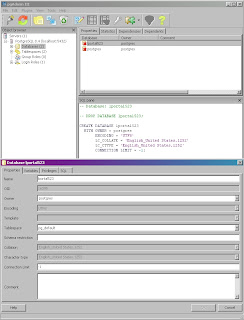
2. Download the appropriate driver version and place in lib/ext
- Open pgAdmin III (Start Menu on Win Systems)
- Enter the name you want to use for the database (ex. lportal523)

2. Download the appropriate driver version and place in lib/ext
Version 3:
Use this if you're running JVM 1.5
http://jdbc.postgresql.org/download/postgresql-8.4-701.jdbc3.jar
Version 4:
Use this if you're running JVM 1.6
http://jdbc.postgresql.org/download/postgresql-8.4-701.jdbc4.jar
Keep in mind that if you're using the Liferay bundle defaults, you're using JVM 1.5.
3. Set the properties in the portal-ext.properties file
jdbc.default.driverClassName=org.postgresql.Driver
jdbc.default.url=jdbc:postgresql://localhost:5432/lportal523
jdbc.default.username=postgres
jdbc.default.password=whateveryourpasswordis
4. Startup Liferay. Your database will look like this:
Enjoy!
Thursday, October 15, 2009
Updated Jan 2010: Liferay - Cool Breadcrumb
I decided to update this after I found some problems with the original method I had posted. Liferay uses breadcrumb styles 1 and 2 for other things for which I did not want to use the apple style but in addition, I've made it into a self-contained cool crumb. This solution is designed to work from directly in the theme and has been tested in 5.2.3.
So you want a cool looking breadcrumb? Perhaps one that's kind of Applish? Well these instructions will get you what you want.

1. Create a file in webapps\ROOT\html. For this example we'll call it crumb.jsp and place the following in it:
<%@ include file="/html/taglib/ui/breadcrumb/init.jsp" %>
<%
StringBuilder sb = new StringBuilder();
sb.append("<ul class='breadcrumb2'>");
_buildBreadcrumb(selLayout, selLayoutParam, portletURL, themeDisplay, true, sb);
%>
<%= sb.toString() %>
<%!
private void _buildBreadcrumb(Layout selLayout, String selLayoutParam, PortletURL portletURL, ThemeDisplay themeDisplay, boolean selectedLayout, StringBuilder sb) throws Exception {
String layoutURL = _getBreadcrumbLayoutURL(selLayout, selLayoutParam, portletURL, themeDisplay);
String target = PortalUtil.getLayoutTarget(selLayout);
StringBuilder breadCrumbSB = new StringBuilder();
breadCrumbSB.append("<li><a href=\"");
breadCrumbSB.append(layoutURL);
breadCrumbSB.append("\" ");
breadCrumbSB.append(target);
breadCrumbSB.append(">");
breadCrumbSB.append(HtmlUtil.escape(selLayout.getName(themeDisplay.getLocale())));
breadCrumbSB.append("</a></li>");
Layout layoutParent = null;
long layoutParentId = selLayout.getParentLayoutId();
if (layoutParentId != LayoutConstants.DEFAULT_PARENT_LAYOUT_ID) {
layoutParent = LayoutLocalServiceUtil.getLayout(selLayout.getGroupId(), selLayout.isPrivateLayout(), layoutParentId);
_buildBreadcrumb(layoutParent, selLayoutParam, portletURL, themeDisplay, false, sb);
sb.append(breadCrumbSB.toString()+"");
}
else {
sb.append(breadCrumbSB.toString()+"");
}
}
private String _getBreadcrumbLayoutURL(Layout selLayout, String selLayoutParam, PortletURL portletURL, ThemeDisplay themeDisplay) throws Exception {
if (portletURL == null) {
return PortalUtil.getLayoutURL(selLayout, themeDisplay);
}
else {
portletURL.setParameter(selLayoutParam, String.valueOf(selLayout.getPlid()));
return portletURL.toString();
}
}
%>
2. In your custom.css file add the following (remember to change the urls to your server):
.breadcrumb2
{
font: 11px Arial, Helvetica, sans-serif;
background-image:url('../images/theme1/bc_bg.png');
background-repeat:repeat-x;
height:30px;
line-height:30px;
color:#9b9b9b;
border:solid 1px #cacaca;
width:100%;
overflow:hidden;
margin:0px;
padding:0px;
}
.breadcrumb2 li
{
list-style-type:none;
float:left;
padding-left:10px;
}
.breadcrumb2 a
{
height:30px;
display:block;
background-image:url('../images/theme1/bc_separator.png');
background-repeat:no-repeat;
background-position:right;
padding-right: 15px;
text-decoration: none;
color:#454545;
}
.breadcrumb2 a:hover
{
color:#35acc5;
}
.home
{
border: none;
margin: 8px 0px;
}
3. Last but not least, here are the images:


This last part will include your new breadcrumb on all pages. Open the portal_normal.vm and include:
$theme.include("/html/crumb.jsp")
So you want a cool looking breadcrumb? Perhaps one that's kind of Applish? Well these instructions will get you what you want.

1. Create a file in webapps\ROOT\html. For this example we'll call it crumb.jsp and place the following in it:
<%@ include file="/html/taglib/ui/breadcrumb/init.jsp" %>
<%
StringBuilder sb = new StringBuilder();
sb.append("<ul class='breadcrumb2'>");
_buildBreadcrumb(selLayout, selLayoutParam, portletURL, themeDisplay, true, sb);
%>
<%= sb.toString() %>
<%!
private void _buildBreadcrumb(Layout selLayout, String selLayoutParam, PortletURL portletURL, ThemeDisplay themeDisplay, boolean selectedLayout, StringBuilder sb) throws Exception {
String layoutURL = _getBreadcrumbLayoutURL(selLayout, selLayoutParam, portletURL, themeDisplay);
String target = PortalUtil.getLayoutTarget(selLayout);
StringBuilder breadCrumbSB = new StringBuilder();
breadCrumbSB.append("<li><a href=\"");
breadCrumbSB.append(layoutURL);
breadCrumbSB.append("\" ");
breadCrumbSB.append(target);
breadCrumbSB.append(">");
breadCrumbSB.append(HtmlUtil.escape(selLayout.getName(themeDisplay.getLocale())));
breadCrumbSB.append("</a></li>");
Layout layoutParent = null;
long layoutParentId = selLayout.getParentLayoutId();
if (layoutParentId != LayoutConstants.DEFAULT_PARENT_LAYOUT_ID) {
layoutParent = LayoutLocalServiceUtil.getLayout(selLayout.getGroupId(), selLayout.isPrivateLayout(), layoutParentId);
_buildBreadcrumb(layoutParent, selLayoutParam, portletURL, themeDisplay, false, sb);
sb.append(breadCrumbSB.toString()+"");
}
else {
sb.append(breadCrumbSB.toString()+"");
}
}
private String _getBreadcrumbLayoutURL(Layout selLayout, String selLayoutParam, PortletURL portletURL, ThemeDisplay themeDisplay) throws Exception {
if (portletURL == null) {
return PortalUtil.getLayoutURL(selLayout, themeDisplay);
}
else {
portletURL.setParameter(selLayoutParam, String.valueOf(selLayout.getPlid()));
return portletURL.toString();
}
}
%>
2. In your custom.css file add the following (remember to change the urls to your server):
.breadcrumb2
{
font: 11px Arial, Helvetica, sans-serif;
background-image:url('../images/theme1/bc_bg.png');
background-repeat:repeat-x;
height:30px;
line-height:30px;
color:#9b9b9b;
border:solid 1px #cacaca;
width:100%;
overflow:hidden;
margin:0px;
padding:0px;
}
.breadcrumb2 li
{
list-style-type:none;
float:left;
padding-left:10px;
}
.breadcrumb2 a
{
height:30px;
display:block;
background-image:url('../images/theme1/bc_separator.png');
background-repeat:no-repeat;
background-position:right;
padding-right: 15px;
text-decoration: none;
color:#454545;
}
.breadcrumb2 a:hover
{
color:#35acc5;
}
.home
{
border: none;
margin: 8px 0px;
}
3. Last but not least, here are the images:


This last part will include your new breadcrumb on all pages. Open the portal_normal.vm and include:
$theme.include("/html/crumb.jsp")
Vaadin Eclipse Plugin
Well I figured since Liferay will be bundling Vaadin in to the mix that I would get acquainted with it. I did the instructions at http://tiny.cc/8wzZS but deviated in the Vaadin version (I used 612) which made it apparently bomb. Hmmm... Oh well...
Eclipse: 3.4.1 - Ganymede
Went on to try the Eclipse plugin. What am I missing here?
I went to File -> New -> Vaadin Project and it does NOTHING. I have to go to File -> New -> Other -> Vaadin Project.
Chose the following options:
Configuration: Default Configuration
Deployment Configuration: Generic Portlet
(Vaadin version 6.1.2) Clicked the Download button
Hit Finish. Hit Cancel.
I have the default System Libs (which I could have gotten from creating a new Java Project). A look at the Build Path reveals I only have the JRE. (I would have thought the Vaadin jar file would have been there since afterall I did download it to god knows where) and in the src I have nothing (I thought I would have at least gotten a class with a GenericPortlet extension but I guess not).
At this point I'm completely clueless why on earth Liferay would choose to integrate this product. Since Vaadin uses GWT why not just use GWT? I'm not a fan of a GWT either because of the bloating but there's some cool tools for it at least.
I hope Liferay spins it's magic on this cause right now I'm sorely disappointed.
Eclipse: 3.4.1 - Ganymede
Went on to try the Eclipse plugin. What am I missing here?
I went to File -> New -> Vaadin Project and it does NOTHING. I have to go to File -> New -> Other -> Vaadin Project.
Chose the following options:
Configuration: Default Configuration
Deployment Configuration: Generic Portlet
(Vaadin version 6.1.2) Clicked the Download button
Hit Finish. Hit Cancel.
I have the default System Libs (which I could have gotten from creating a new Java Project). A look at the Build Path reveals I only have the JRE. (I would have thought the Vaadin jar file would have been there since afterall I did download it to god knows where) and in the src I have nothing (I thought I would have at least gotten a class with a GenericPortlet extension but I guess not).
At this point I'm completely clueless why on earth Liferay would choose to integrate this product. Since Vaadin uses GWT why not just use GWT? I'm not a fan of a GWT either because of the bloating but there's some cool tools for it at least.
I hope Liferay spins it's magic on this cause right now I'm sorely disappointed.
GenericPortlet & Ajax
Anyone familiar with form submission knows that the processAction takes care of the processing as far as the backend goes but in case you're wondering how to process an Ajax call, look no further.
In your JSP, you must use the ResourceURL ()
For this quick example, I use JavaScript to handle the call:
And your portlet should use the serveResource for processing:
This of course is just example code but if you want to pass a tidbit of info back to your jsp you have to use the print (and don't forget to close the writer).
In your JSP, you must use the ResourceURL ()
ResourceURL resourceURL = renderResponse.createResourceURL();
For this quick example, I use JavaScript to handle the call:
function delFav(thisFav) {
if(confirm("This will delete your favourite. Are you sure you want to continue?")) {
$("div#showaddfav").html(" Deleting your favourite. Please wait.");
$.post("<%=resourceURL%>", { delFav: thisFav, usersId: "<%=themeDisplay.getUserId()%>" },
function(data){

if(checkType("del-saved", data) != -1) { $("#showaddfav").html("<span class="portlet-msg-success">Your favourite was deleted. Congrats!</span>"); }
if(checkType("error", data) != -1) { $("#showaddfav").html("<span class="portlet-msg-error">An unknown error has occured. Please notify the Administrator.</span>"); }
});
} else { return; }

}

function checkType(expr, thisUrl) {
return thisUrl.search(expr);
}
And your portlet should use the serveResource for processing:
import java.io.PrintWriter;
import javax.portlet.ResourceRequest;
import javax.portlet.ResourceResponse;

public void serveResource(ResourceRequest req, ResourceResponse resp)
throws PortletException, IOException {
resp.setContentType("text/html");
PrintWriter writer = resp.getWriter();

// User want to delete
String delFav = ParamUtil.getString(req, "delFav");

try {

writer.print("<div id="response-wrap">del-saved</div>");

} catch (PortalException e) {
writer.print(" <div id="response-wrap">error</div>");
e.printStackTrace();
} catch (SystemException e) {
writer.print(" <div id="response-wrap">error</div>");
e.printStackTrace();
}
writer.close();
}
This of course is just example code but if you want to pass a tidbit of info back to your jsp you have to use the print (and don't forget to close the writer).
Wednesday, October 14, 2009
How to Localize a Browse Button
Yes, I have seen more complaints about this than you can image but the good news is not only can you 'localize' it but make it pretty. Wanna see what I'm talking about?
In case you're not familiar with the problem, a form input type of "file" connects to the client's operating system via an Application Programming Interface (API). That familiar window that allows us to select our file is displayed depending on your operating system (*nix, Windows, Mac). Because of this, it was deemed as a security risk to allow a developer to interfere in any way with this functionality.
First and foremost, this will work in IE 6 and 7, FF 2 and 3, and Safari on MAC.
1) 2 Images: One to display English one to display French. (Or whatever languages you choose.)


Admittedly, these aren't pretty but they'll do. The file name you give your images plays a roll (well at least for this example). The English one I've called browseen_US and browsefr_FR. Why? Because when we swap (by pressing the French or English link) the buttons will swap based on locale. In addition, the image dimensions should stay the same. In this case they're not quite the same so you can see the difference.
2) The Code (Read the comments throughout)
<html>
<head>
<script type="text/javascript">
//Set your default language
var myLang="fr_FR";
//The 'switchTo...' functions will be triggered when we select the
//English or French link.
//The call to initFileUploads updates the UI.
function switchToEnglish() {
myLang="en_US";
initFileUploads();
}
function switchToFrench() {
myLang="fr_FR";
initFileUploads();
}
//This function will update the UI. Note this is where the magic happens.
//We will be using a regular file input type but we use a combination
//of CSS and JavaScript to overlay the English and French buttons.
function initFileUploads() {
var fakeFileUpload = document.createElement('div');
fakeFileUpload.className = 'fakefile';
fakeFileUpload.appendChild(document.createElement('input'));
var image = document.createElement('img');
image.src='browse'+myLang+'.jpg';
image.id="uploadImgId";
fakeFileUpload.appendChild(image);
var x = document.getElementsByTagName('input');
for (var i=0;i<x.length;i++) {
if (x[i].type != 'file') continue;
if (x[i].parentNode.className != 'fileinputs') continue;
x[i].className = 'file hidden';
var clone = fakeFileUpload.cloneNode(true);
x[i].parentNode.appendChild(clone);
x[i].relatedElement = clone.getElementsByTagName('input')[0];
x[i].onchange = x[i].onmouseout = function () {
this.relatedElement.value = this.value;
}
}
}
//This function is called just as a test to see what will be submitted.
//The output will be different depending on the browser you're using.
function viewSubmit() {
for(i=0; i<document.browseTest.elements.length; i++) {
if(document.browseTest.elements[i].name == "") {
document.write("This is the dynamically generated input. ---- ");
}
document.write("The field name is: " + document.browseTest.elements[i].name + " and it’s value is: " + document.browseTest.elements[i].value + ".<br />");
}
}
</script>
<!--These styles are needed for the magic to work. You may have to adapt these depending on what browser you need this to work in. -- >
<style type="text/css">
div.fileinputs {
position: relative;
/*ie7 and ff2 are colliding*/
width: auto;
}
div.fileinputs .file {
/*For ie7 only*/
width: 235px;
}
div.fakefile {
position: absolute;
top: 0px;
left: 0px;
z-index: 1;
}
input.file {
position: relative;
text-align: right;
-moz-opacity:0 ;
filter:alpha(opacity: 0);
opacity: 0;
/*Required for ff2 ONLY*/
width: 145px;
z-index: 2;
}
#uploadImgId {
position: absolute;
/*ie 7 needs this*/
width: 90px;
}
</style>
</head>
<!--The initFileUploads is called to update the UI upon entering the page. -->
<body onload="initFileUploads();">
<fieldset><legend>Browse Button Localization</legend>
Select Language: <a href="#" onclick="switchToEnglish()">English</a>
<a href="javascript:switchToFrench()">French</a><p>
<form name="browseTest" class="example">
<div class="fileinputs">
<input type="file" class="file" name="originalFileInput"/>
</div>
<br />
<input type="button" name="submit" value="View the Submission Value" onclick="viewSubmit()">
</form>
</fieldset>
</body>
</html>
Feel free to swipe!
In case you're not familiar with the problem, a form input type of "file" connects to the client's operating system via an Application Programming Interface (API). That familiar window that allows us to select our file is displayed depending on your operating system (*nix, Windows, Mac). Because of this, it was deemed as a security risk to allow a developer to interfere in any way with this functionality.
What browser will this work on?
First and foremost, this will work in IE 6 and 7, FF 2 and 3, and Safari on MAC.
What you need
1) 2 Images: One to display English one to display French. (Or whatever languages you choose.)


Admittedly, these aren't pretty but they'll do. The file name you give your images plays a roll (well at least for this example). The English one I've called browseen_US and browsefr_FR. Why? Because when we swap (by pressing the French or English link) the buttons will swap based on locale. In addition, the image dimensions should stay the same. In this case they're not quite the same so you can see the difference.
2) The Code (Read the comments throughout)
<html>
<head>
<script type="text/javascript">
//Set your default language
var myLang="fr_FR";
//The 'switchTo...' functions will be triggered when we select the
//English or French link.
//The call to initFileUploads updates the UI.
function switchToEnglish() {
myLang="en_US";
initFileUploads();
}
function switchToFrench() {
myLang="fr_FR";
initFileUploads();
}
//This function will update the UI. Note this is where the magic happens.
//We will be using a regular file input type but we use a combination
//of CSS and JavaScript to overlay the English and French buttons.
function initFileUploads() {
var fakeFileUpload = document.createElement('div');
fakeFileUpload.className = 'fakefile';
fakeFileUpload.appendChild(document.createElement('input'));
var image = document.createElement('img');
image.src='browse'+myLang+'.jpg';
image.id="uploadImgId";
fakeFileUpload.appendChild(image);
var x = document.getElementsByTagName('input');
for (var i=0;i<x.length;i++) {
if (x[i].type != 'file') continue;
if (x[i].parentNode.className != 'fileinputs') continue;
x[i].className = 'file hidden';
var clone = fakeFileUpload.cloneNode(true);
x[i].parentNode.appendChild(clone);
x[i].relatedElement = clone.getElementsByTagName('input')[0];
x[i].onchange = x[i].onmouseout = function () {
this.relatedElement.value = this.value;
}
}
}
//This function is called just as a test to see what will be submitted.
//The output will be different depending on the browser you're using.
function viewSubmit() {
for(i=0; i<document.browseTest.elements.length; i++) {
if(document.browseTest.elements[i].name == "") {
document.write("This is the dynamically generated input. ---- ");
}
document.write("The field name is: " + document.browseTest.elements[i].name + " and it’s value is: " + document.browseTest.elements[i].value + ".<br />");
}
}
</script>
<!--These styles are needed for the magic to work. You may have to adapt these depending on what browser you need this to work in. -- >
<style type="text/css">
div.fileinputs {
position: relative;
/*ie7 and ff2 are colliding*/
width: auto;
}
div.fileinputs .file {
/*For ie7 only*/
width: 235px;
}
div.fakefile {
position: absolute;
top: 0px;
left: 0px;
z-index: 1;
}
input.file {
position: relative;
text-align: right;
-moz-opacity:0 ;
filter:alpha(opacity: 0);
opacity: 0;
/*Required for ff2 ONLY*/
width: 145px;
z-index: 2;
}
#uploadImgId {
position: absolute;
/*ie 7 needs this*/
width: 90px;
}
</style>
</head>
<!--The initFileUploads is called to update the UI upon entering the page. -->
<body onload="initFileUploads();">
<fieldset><legend>Browse Button Localization</legend>
Select Language: <a href="#" onclick="switchToEnglish()">English</a>
<a href="javascript:switchToFrench()">French</a><p>
<form name="browseTest" class="example">
<div class="fileinputs">
<input type="file" class="file" name="originalFileInput"/>
</div>
<br />
<input type="button" name="submit" value="View the Submission Value" onclick="viewSubmit()">
</form>
</fieldset>
</body>
</html>
Feel free to swipe!
What have I done with Liferay?
I've had a lot of fun with the portal. This is a partial list of the standalone portlets I've done (doesn't include velocity, ext env, themes, tweaks and changes in the built-in JSPs)
Standalone Liferay Portlet Apps:
Domain Configuration: Those matching an IP are automatically logged-in.
Front and back ends + Partial Hook
Preferences and View
Dormant Accounts: Lists accounts that have been inactive for 1-3-6-12 months.
Front and back ends
Modified Users: Reports changes that users have made.
Front and back ends
Originally implemented as a service which was later changed to an Oracle trigger based on 3 tables.
User Communication: Allows Admin to mail selectable Groups or individuals.
Front and back ends
Preferences and view
Download Stats: Provides links to the 3 top downloaded documents + hits.
Front and back ends
Document Library: Displays Document Library files as a selectable tree view. Excludes swf files. Displays non HTML and text files in div and all others in 3rd party viewer (Adeptol) except for tar/zips which are downloads. Integrated 'Favourites' functionality (Add and Delete).
Front and back ends
My Favourites: Display 4 documents selected as the 'Favourites'. Has full portlet functionality (minimize, maximize, move, and resize). Also includes management (add and delete) and 'sky scraper' view (view in full screen).
Front and back ends
Search by Date Range: Allows user to search Document Library by keywords and/or date range. Front and back ends
Contact Us/Feedback: If the user is logged-in, name and email address are automatically populated.
Front and back ends
Report Error: Clicking on a link prepopulates form with the error page. It also allows the user to enter comments. Clicking Send automatically sends the form data to the Admin.
Front and back ends
Preferences and view
Import Users: Imports user information from a CSV and from an external database.
Front and back ends
Verify Import: Reports errors or omissions of user information from the Import Users portlet.
Admin Reports: Schedules reports and generates them.
Front and back ends
Preferences and view
GeoRSS: Consumer and Producer using Rome (supports standard protocols)
Various Google portlets.
Standalone Liferay Portlet Apps:
Domain Configuration: Those matching an IP are automatically logged-in.
Front and back ends + Partial Hook
Preferences and View
Dormant Accounts: Lists accounts that have been inactive for 1-3-6-12 months.
Front and back ends
Modified Users: Reports changes that users have made.
Front and back ends
Originally implemented as a service which was later changed to an Oracle trigger based on 3 tables.
User Communication: Allows Admin to mail selectable Groups or individuals.
Front and back ends
Preferences and view
Download Stats: Provides links to the 3 top downloaded documents + hits.
Front and back ends
Document Library: Displays Document Library files as a selectable tree view. Excludes swf files. Displays non HTML and text files in div and all others in 3rd party viewer (Adeptol) except for tar/zips which are downloads. Integrated 'Favourites' functionality (Add and Delete).
Front and back ends
My Favourites: Display 4 documents selected as the 'Favourites'. Has full portlet functionality (minimize, maximize, move, and resize). Also includes management (add and delete) and 'sky scraper' view (view in full screen).
Front and back ends
Search by Date Range: Allows user to search Document Library by keywords and/or date range. Front and back ends
Contact Us/Feedback: If the user is logged-in, name and email address are automatically populated.
Front and back ends
Report Error: Clicking on a link prepopulates form with the error page. It also allows the user to enter comments. Clicking Send automatically sends the form data to the Admin.
Front and back ends
Preferences and view
Import Users: Imports user information from a CSV and from an external database.
Front and back ends
Verify Import: Reports errors or omissions of user information from the Import Users portlet.
Admin Reports: Schedules reports and generates them.
Front and back ends
Preferences and view
GeoRSS: Consumer and Producer using Rome (supports standard protocols)
Various Google portlets.
Cool Online Tools & Resources
The nice thing about the majority of these free tools is that no account creation is required.
Button Factory - http://dabuttonfactory.com/
Create buttons online. It's free and has nice 2.0 buttons!
Drawter - http://drawter.com/
Whoever made this deserves an award. Quite intuitive free tool that allows you to draw your website and generates the code for it.
WhosAmungUs - http://whos.amung.us/
Web site tracking widget including displaying visitor info on a map.
Sosius - http://sosius.com/Haven't tried this personally (yet) but it looks cool. It's an online workspace.
Bubbl.us - http://www.bubbl.us/
Cool mind mapping online.
Buttonator - http://www.buttonator.com/
Modern styles for making buttons.
Charts - http://charts.hohli.com/
Great for making quick charts.
Online Code Converter - http://code.cside.com/3rdpage/us/javaUnicode/converter.html
Convert character codes.
MorgueFile - http://www.morguefile.com/
Stock photos even for commercial use (read the 'license').
Wufoo - http://wufoo.com/
Create online forms for every occassion you can imagine. Versatile and good for inspiration.
280 Slides - http://280slides.com/Editor/
It's basically Powerpoint online. Free and easy.
Color Scheme Designer 3 - http://colorschemedesigner.com/
Design colour schemes online. (Nice interface)
COLOURlovers - http://www.colourlovers.com/palettes
This is an interesting site that not only provides colour schemes but also schemes based on patterns.
Pattern Tap - http://patterntap.com/
Awesome place for inspiration. You can view the different looks of 404 Pages, Audio, Breadcrumbs, Borders, Comments, Contact etc...
Kuler - http://kuler.adobe.com/#themes/rating?time=30
Colour schemes you can contribute and create.
IzzyMenu (Builder) - http://www.izzymenu.com/
Comprehensive online menu builder that doesn't require an account.
Wirenode - http://www.wirenode.com/
This is an "ok" site. It provides a fast way, visual way of creating a site for mobile devices.
doTemplate - http://www.dotemplate.com/
This is the ultimate for lazy visual people. Customize the templates they have online and the templates are actually good!
Web Graphics Maker - http://en.web-graphics-maker.com/
Make backgrounds, lines, and bullets online. Includes transparency on png's.
Bradicon! - http://ico.bradleygill.com/advanced.php
Turn images in to icons.
Text to PNG - http://www.text2png.com/
Interesting concept. Converts plain text into a png. You can either use hosted (free) or grab the source for yourself (requires php).
Iconspedia - http://www.iconspedia.com/
Ok, not a tool but wicked Web 2.0 style icons/buttons/images.
Fresh Badge - http://www.freshbadge.com/
An ok site that generates badges.
Loading GIF Generator - http://www.webscriptlab.com/index.php
Good idea! Create animations to use as a 'loading' message.
Dynamic Drive Button Maker Online - http://tools.dynamicdrive.com/button/
Creates small buttons (eg, rss, xhtml etc...)
Timelines - http://www.mytimelines.net/
Create cut and paste timelines from any feed.
Wordle - http://www.wordle.net/
Create tag clouds.
Iaza - http://iaza.com/
Vast assortment of image manipulation capabilities online.
LogoMaker - http://logomaker.com/
Cool creative customizable icons. Create the logo and link to it for free or download it for a price.
FotoFlexer - http://fotoflexer.com/
Basic image manipulation online.
Maya - http://www.stockfreephoto.com/
Online image manipulation. You can also download this and place it on your own site for free. (PHP)
Pixenate - http://pixenate.com/
Another free online image manipulation site.
Online Button Maker - http://www.advancewebsoft.com/free-oscommerce-cre-loaded-zen-cart-oscmax-button-generator-p.html
Pretty good button generator.
P&P World Map - http://edit.freemap.jp/en/trial_version/edit/world
Allows you to customize the look of a map and dowload it. Pretty cool!
Big Huge Labs - http://bighugelabs.com/
Show off your pics from Flickr or Facebook. Create calendars, motivation posters, badges and more.
CSS Round Corner Generator - http://www.roundedcornr.com/ Pretty cool generator!
Cool Text - http://cooltext.com/
Cool Text
Logo Generator - http://www.logogenerator.com/
Excellent online logo generator and it's free!
Button Factory - http://dabuttonfactory.com/
Create buttons online. It's free and has nice 2.0 buttons!
Drawter - http://drawter.com/
Whoever made this deserves an award. Quite intuitive free tool that allows you to draw your website and generates the code for it.
WhosAmungUs - http://whos.amung.us/
Web site tracking widget including displaying visitor info on a map.
Sosius - http://sosius.com/Haven't tried this personally (yet) but it looks cool. It's an online workspace.
Bubbl.us - http://www.bubbl.us/
Cool mind mapping online.
Buttonator - http://www.buttonator.com/
Modern styles for making buttons.
Charts - http://charts.hohli.com/
Great for making quick charts.
Online Code Converter - http://code.cside.com/3rdpage/us/javaUnicode/converter.html
Convert character codes.
MorgueFile - http://www.morguefile.com/
Stock photos even for commercial use (read the 'license').
Wufoo - http://wufoo.com/
Create online forms for every occassion you can imagine. Versatile and good for inspiration.
280 Slides - http://280slides.com/Editor/
It's basically Powerpoint online. Free and easy.
Color Scheme Designer 3 - http://colorschemedesigner.com/
Design colour schemes online. (Nice interface)
COLOURlovers - http://www.colourlovers.com/palettes
This is an interesting site that not only provides colour schemes but also schemes based on patterns.
Pattern Tap - http://patterntap.com/
Awesome place for inspiration. You can view the different looks of 404 Pages, Audio, Breadcrumbs, Borders, Comments, Contact etc...
Kuler - http://kuler.adobe.com/#themes/rating?time=30
Colour schemes you can contribute and create.
IzzyMenu (Builder) - http://www.izzymenu.com/
Comprehensive online menu builder that doesn't require an account.
Wirenode - http://www.wirenode.com/
This is an "ok" site. It provides a fast way, visual way of creating a site for mobile devices.
doTemplate - http://www.dotemplate.com/
This is the ultimate for lazy visual people. Customize the templates they have online and the templates are actually good!
Web Graphics Maker - http://en.web-graphics-maker.com/
Make backgrounds, lines, and bullets online. Includes transparency on png's.
Bradicon! - http://ico.bradleygill.com/advanced.php
Turn images in to icons.
Text to PNG - http://www.text2png.com/
Interesting concept. Converts plain text into a png. You can either use hosted (free) or grab the source for yourself (requires php).
Iconspedia - http://www.iconspedia.com/
Ok, not a tool but wicked Web 2.0 style icons/buttons/images.
Fresh Badge - http://www.freshbadge.com/
An ok site that generates badges.
Loading GIF Generator - http://www.webscriptlab.com/index.php
Good idea! Create animations to use as a 'loading' message.
Dynamic Drive Button Maker Online - http://tools.dynamicdrive.com/button/
Creates small buttons (eg, rss, xhtml etc...)
Timelines - http://www.mytimelines.net/
Create cut and paste timelines from any feed.
Wordle - http://www.wordle.net/
Create tag clouds.
Iaza - http://iaza.com/
Vast assortment of image manipulation capabilities online.
LogoMaker - http://logomaker.com/
Cool creative customizable icons. Create the logo and link to it for free or download it for a price.
FotoFlexer - http://fotoflexer.com/
Basic image manipulation online.
Maya - http://www.stockfreephoto.com/
Online image manipulation. You can also download this and place it on your own site for free. (PHP)
Pixenate - http://pixenate.com/
Another free online image manipulation site.
Online Button Maker - http://www.advancewebsoft.com/free-oscommerce-cre-loaded-zen-cart-oscmax-button-generator-p.html
Pretty good button generator.
P&P World Map - http://edit.freemap.jp/en/trial_version/edit/world
Allows you to customize the look of a map and dowload it. Pretty cool!
Big Huge Labs - http://bighugelabs.com/
Show off your pics from Flickr or Facebook. Create calendars, motivation posters, badges and more.
CSS Round Corner Generator - http://www.roundedcornr.com/ Pretty cool generator!
Cool Text - http://cooltext.com/
Cool Text
Logo Generator - http://www.logogenerator.com/
Excellent online logo generator and it's free!
Subscribe to:
Posts (Atom)